Why Local Google Ads Are the Fastest Way to Grow Your Local Business
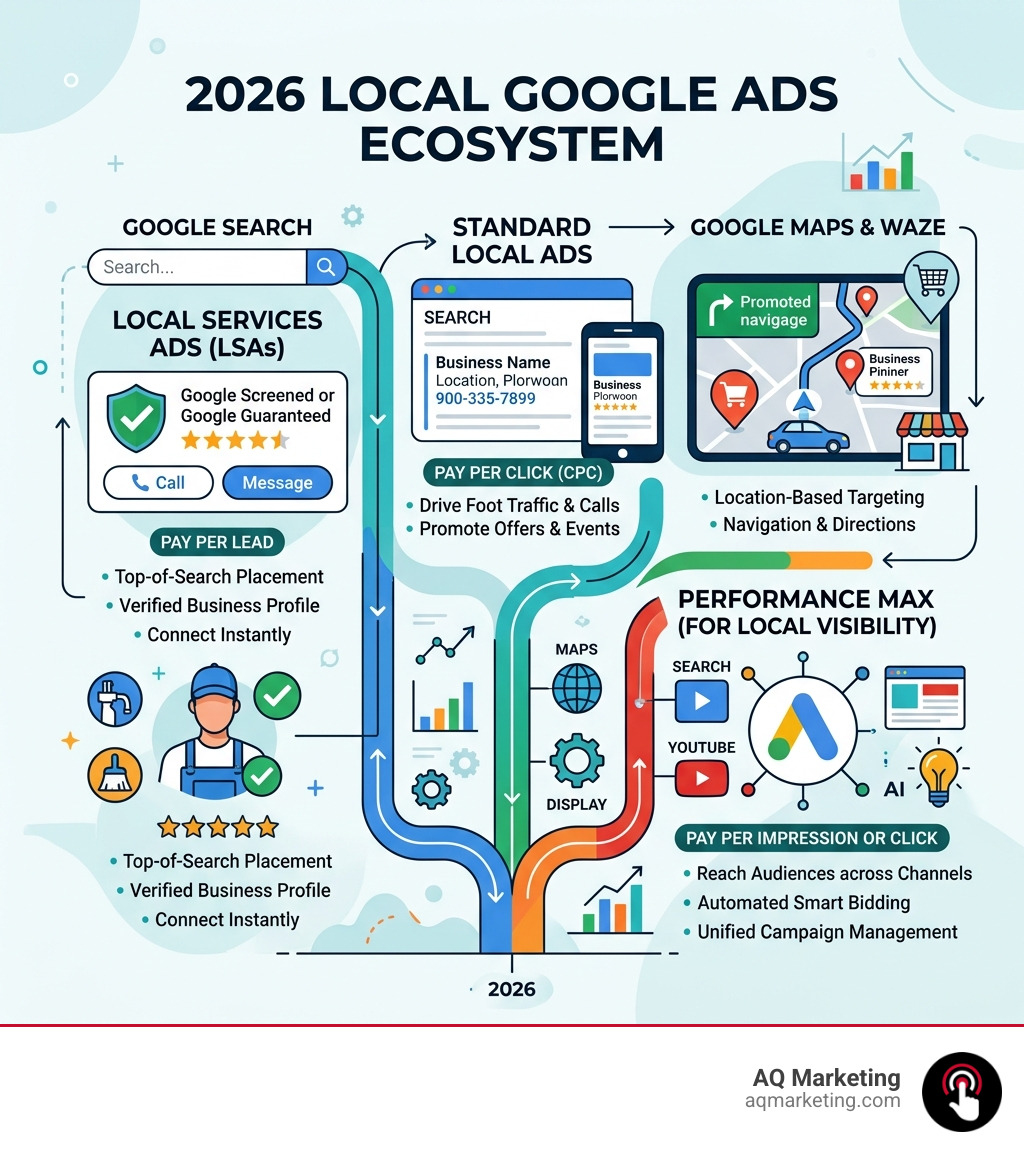
Local Google Ads are a powerful set of advertising tools that help businesses with a physical location or service area get discovered by nearby customers at the exact moment they’re searching.
Here’s a quick overview of what you need to know:
Ad Type
Where It Appears
How You Pay
Best For
Local Services Ads
Top of Google Search
Per lead (call or message)
Home & professional services
Standard Local Google Ads
Search, Maps, Waze
Per click (CPC)
Physical storefronts, service areas
Performance Max (Local)
Search, Maps, YouTube, Display
Per click or impression
Broad local visibility
The two main types — Local Services Ads and standard Local Ads — work very differently. Local Services Ads place your business above regular search results and charge you only when a customer actually contacts you. Standard Local Ads run across Google Search, Google Maps, and even Waze, charging per click.
For small and medium-sized businesses in competitive markets, choosing the right format — or combining both — can be the difference between a slow month and a full calendar.
I’m Robert P. Dickey, President and CEO of AQ Marketing, and over my 20+ years in digital marketing I’ve helped countless local businesses across New England build smarter strategies around Local Google Ads to consistently generate qualified leads. In the sections ahead, I’ll walk you through exactly how to use these tools to drive more foot traffic and booked jobs for your business.
Understanding the Ecosystem of Local Google Ads
Navigating digital advertising in 2026 feels a bit like driving through the rotary in Concord—it’s fast, a little crowded, but perfectly manageable once you know which lane to be in. To master Local Google Ads, we first need to understand where these ads actually live.
Google has integrated local results into almost every corner of its platform. When a customer in Woburn or Beverly searches for a service, they aren’t just looking at a list of blue links. They are seeing a map, a set of “Guaranteed” badges, and even pins on their GPS.
Google Search and Maps
Standard Local Ads serve primarily on Google Search and Google Maps. These ads help businesses with a physical location reach users to drive store visits, sales, and leads. According to About Local Ads – Google Ads Help, these ads pull media assets directly from your Google Business Profile. This means your address, hours, and photos are automatically baked into the ad.
Performance Max and Waze
In 2026, Performance Max has become the heavy lifter for local visibility. It pushes your local business information across Search, Maps, YouTube, and the Display Network. Furthermore, if you are targeting drivers in the US, Local Ads also appear on Waze as square pins. This is a game-changer for businesses in high-traffic areas like Braintree or Framingham, where a well-timed pin on a commuter’s map can drive immediate foot traffic.
Achieving a high return on investment requires more than just “turning on” ads. As we discuss in our guide on Getting Local Paid Search Right: How to Achieve ROAS, success comes from aligning your campaign settings with actual local intent.
The Role of Proximity in Local Google Ads Ranking
Proximity is perhaps the most critical factor in the Local Google Ads ecosystem. Google’s primary goal is to provide the most relevant answer to a user’s query. If someone in Arlington searches for “emergency plumber,” Google isn’t going to show them a business located in Springfield, no matter how high their bid is.
User Location: Google uses GPS, IP addresses, and past behavior to pinpoint exactly where the searcher is standing.
Service Area: For service-based businesses, you define your “service area” (e.g., a 20-mile radius around Woburn). Your ads will only trigger for users within that boundary.
Geo-fencing: This allows us to get even more granular, showing ads only to people within a specific neighborhood or even near a competitor’s location.
Search Relevance: Proximity is balanced with relevance. If you are the closest business but your profile is incomplete, Google may skip you in favor of a slightly further business with better reviews.
Maximizing Reach with Standard Local Google Ads
Standard Local Ads are incredibly versatile. Unlike the newer Local Services Ads, these allow for traditional search campaigns where you bid on specific keywords like “best Italian restaurant” or “insurance agency near me.”
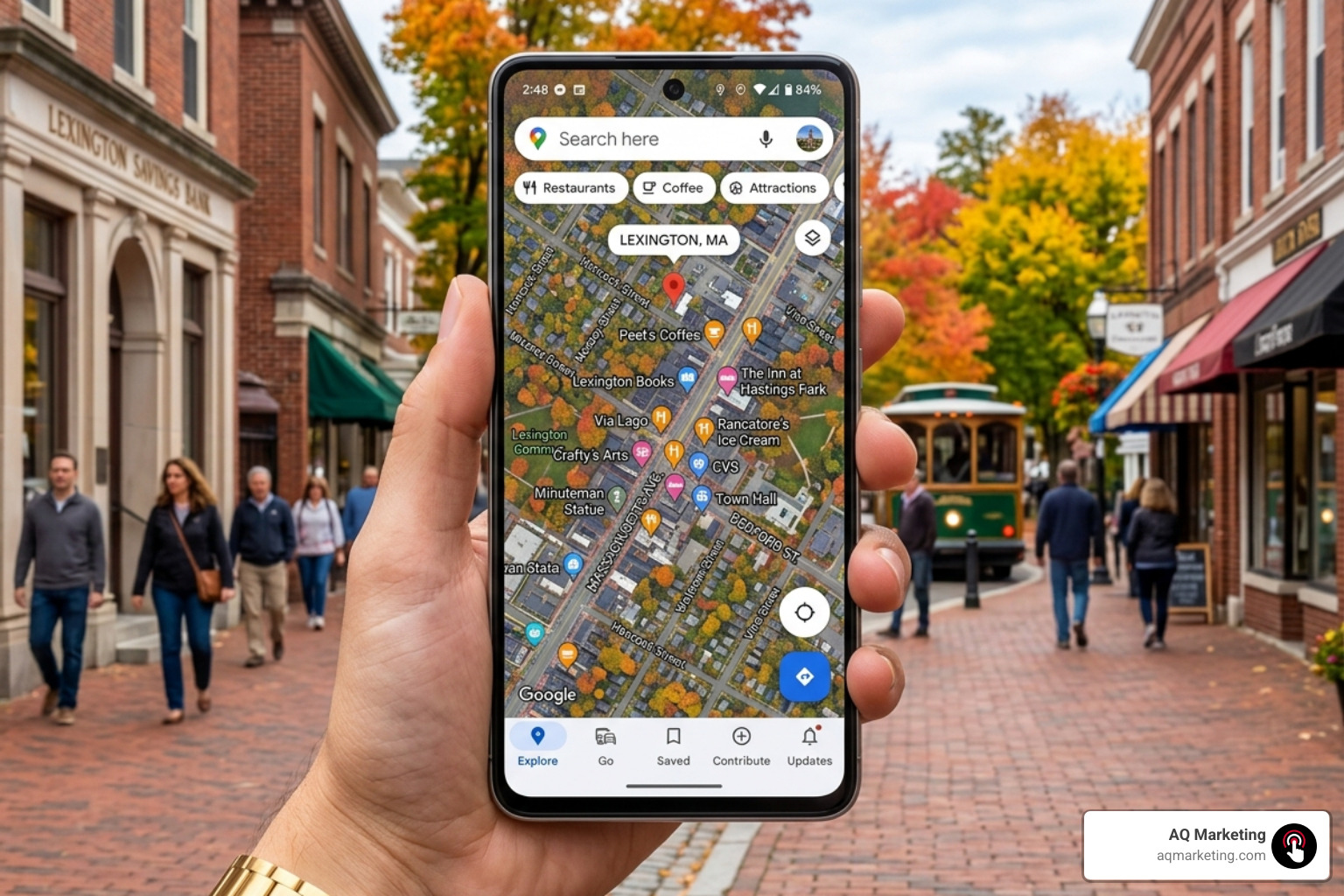
One of the best ways to stand out is through branded pins on Google Maps. These pins feature your logo and appear even when a user isn’t actively searching for your business, but is simply navigating near your shop. Additionally, we always recommend using call extensions. On mobile devices, these show up as a “Call” button, allowing a customer in Burlington to contact you with a single tap.
For businesses in our neck of the woods, it pays to have local expertise. Understanding the nuances of North Shore vs. South Shore traffic patterns can help you schedule your ads more effectively. That’s Why Your Burlington Google Ads Strategy Needs a Boston Expert—someone who knows that a “five-mile drive” in Boston can take twenty minutes or an hour depending on the time of day!
Local Services Ads vs. Standard Google Ads: A Strategic Comparison
Choosing between Local Services Ads (LSAs) and standard Local Google Ads is like choosing between a specialized tool and a multi-tool. Both have their place, but they serve different purposes.
Feature
Local Services Ads (LSAs)
Standard Google Ads
Pricing Model
Pay-Per-Lead (PPL)
Pay-Per-Click (PPC)
Placement
Very top of the page (above PPC)
Top and bottom of search results
Verification
Required (Google Guaranteed/Screened)
Optional (Standard verification)
Keywords
Automated by Google
Hand-picked by the advertiser
Best For
High-intent service calls
Brand awareness & foot traffic
While standard ads focus on clicks to your website, LSAs are designed for direct lead generation. If you’re looking for a comprehensive overview of how these fit into a broader marketing plan, check out our PPC Advertising Services Complete Guide.
The Pay-Per-Lead Model in Local Services Ads
The biggest draw for LSAs is the Pay-Per-Lead model. You don’t pay when someone looks at your ad. You don’t pay when they click your profile. You only pay when a customer calls, messages, or books a service through the ad.
Qualified Leads: A lead is considered valid if the customer contacts you about a service you provide in an area you cover.
Direct Contact: Leads come in via phone calls or the Local Services app.
Dispute Management: This is a crucial part of the process. If you receive a “junk” lead—like a solicitor or someone looking for a service you clearly don’t offer—you can dispute the charge with Google to get your money back.
Eligibility and the Power of the Google Verified Badge
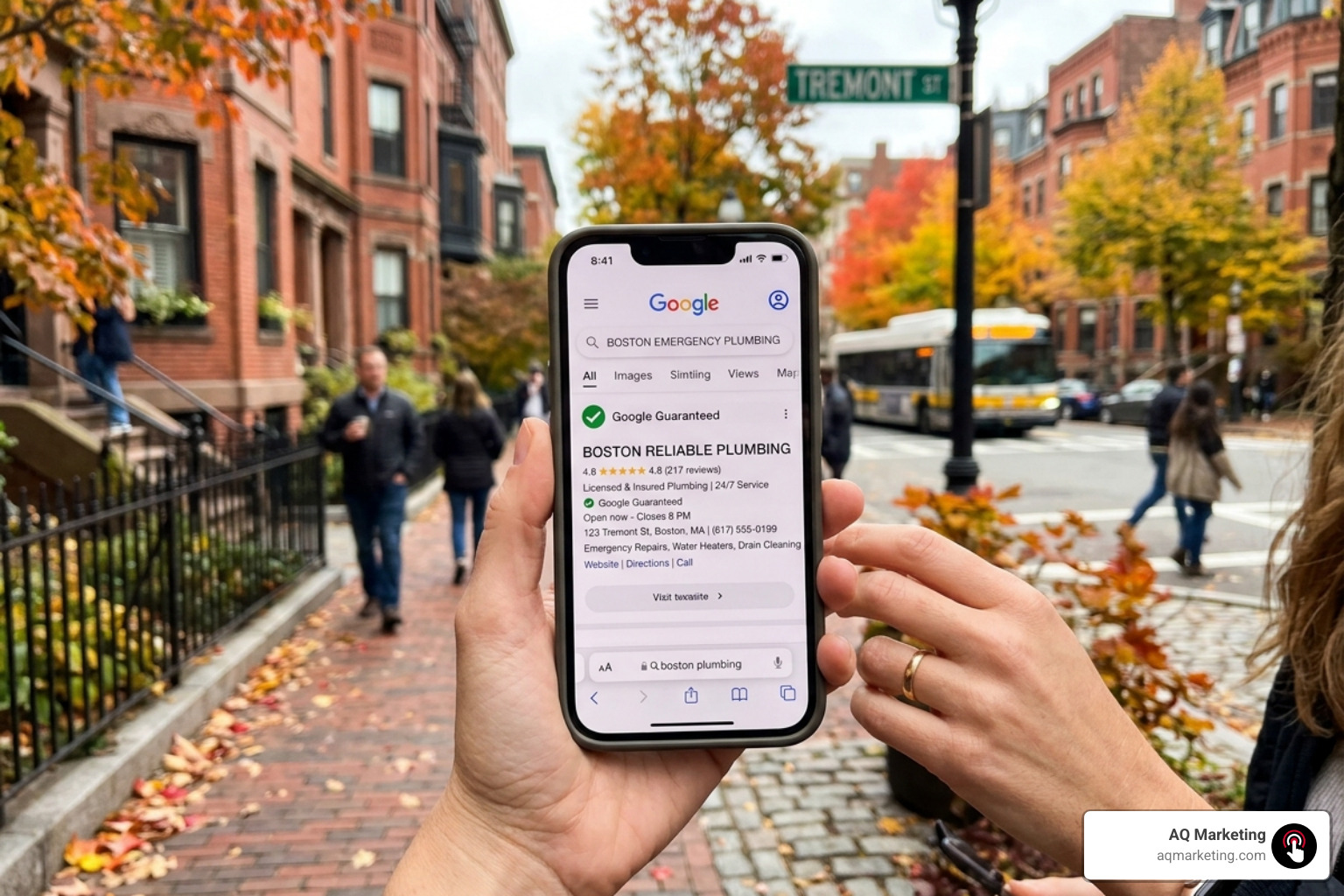
In a world of online scams and “fly-by-night” operations, trust is the ultimate currency. The Google Verified badge—often seen as the Google Guaranteed (green checkmark) or Google Screened badge—is how you prove to your neighbors in Newton or Quincy that you are the real deal.
The Verification Process
Getting this badge isn’t as simple as clicking a button. Google puts businesses through a rigorous screening process that includes:
Background Checks: Business owners (and sometimes field employees) must pass a background check.
License Verification: You must provide proof of your professional licenses. For example, a Plumber Google Ads campaign requires current state-level licensing to be eligible for the guarantee.
Insurance Requirements: You must provide proof of general liability insurance.
The benefit? Google literally “guarantees” your work. If a customer is unsatisfied with the quality of your service, Google may, at its discretion, reimburse the customer up to a lifetime limit (typically $2,000 in the US). This builds massive confidence before the customer even picks up the phone.
Industry Categories for Google Guaranteed and Screened
Not every business is eligible for every badge. The categories have expanded significantly leading into 2026.
Google Guaranteed: Primarily for home services like plumbing, HVAC, roofing, house cleaning, and appliance repair.
Google Screened: Aimed at professional services such as legal services, real estate, financial planning, and tax services. These focus more on professional credentialing than on a money-back guarantee.
License Verified: Used for industries like healthcare or wellness (e.g., acupuncturists or dentists) where the badge signals that the practitioner is properly licensed to practice in Massachusetts.
Using these badges effectively is a core part of Local Audience Targeting. It tells the local community that you have been vetted by the world’s largest search engine.
Strategic Setup and Optimization for Maximum Visibility
Setting up your Local Google Ads is just the beginning. To truly master the platform and outrank your competitors in places like Worcester or Lowell, you need to optimize for Google’s ranking factors.
Profile Completeness and the Google Business Profile
Your ads are only as good as the profile behind them. For standard Local Ads, this means having a robust Google Business Profile. Ensure your name, address, and phone number (NAP) are consistent across the web. Add high-quality photos of your team, your office, and your completed projects.
The “Big Three” Ranking Factors for LSAs
For Local Services Ads, Google uses a specific set of metrics to decide who gets the top spot:
Review Count and Rating: This is the most important factor. A business with 500 five-star reviews will almost always outrank one with 50 reviews.
Response Time: How fast do you answer the phone? If you consistently miss calls or take hours to respond to messages, Google will stop showing your ads. They want to send leads to businesses that actually answer.
Proximity: As mentioned earlier, being closer to the searcher gives you a natural boost.
Budget Allocation
Don’t be afraid to set a competitive budget. In Local Google Ads, your budget isn’t just a limit—it’s a signal of your capacity. If your budget is too low, Google may assume you can’t handle more leads and will throttle your visibility. For a deep dive into the technical side of things, see The No-Nonsense Guide to Google Ads Account Setup.
Budgeting and Managing Your Local Lead Flow
Managing the financial side of Local Google Ads requires a shift in mindset. Instead of thinking about “how much I’m spending,” think about “how much each customer costs.”
Spending Control
Both standard ads and LSAs allow you to set a maximum weekly or monthly budget. You can pause your ads at any time—perfect for when your crew is fully booked for a week or if you’re heading down to the Cape for a vacation.
Lead Management Tools
Google provides a dedicated dashboard for LSAs where you can listen to call recordings, respond to messages, and track the status of every lead (e.g., “Booked,” “Completed,” or “Archive”). This data is gold. By reviewing call recordings, you can see if your front-desk staff is effectively turning callers into customers.
Frequently Asked Questions about Local Google Ads
How much do Local Services Ads cost in 2026?
The cost per lead in 2026 varies significantly based on your industry and location. Based on average online data, typical lead costs range from $20 to over $200 per lead depending on the vertical.
Lower Competition (e.g., house cleaning): $20 – $50 per lead.
High Competition (e.g., water damage restoration or legal): $150 – $450+ per lead.
Please note: These figures are based on industry averages and do not represent AQ Marketing’s actual pricing.
How do I get the Google Guaranteed badge for my business?
The process involves signing up through the Local Services Ads portal, submitting your business licenses, providing proof of insurance, and undergoing a background check through Google’s third-party partners. It typically takes 2–4 weeks to complete the verification, though this can vary based on how quickly you provide documentation.
Can I run both Local Services Ads and standard Google Ads simultaneously?
Yes—and we often recommend it! This strategy is known as “search dominance.” By running both, you can potentially appear three times on a single search result page: once in the LSAs at the very top, once in the standard PPC ads, and once in the organic map pack. This maximizes your brand visibility and makes it much more likely that a customer will click on your business instead of a competitor’s.
Conclusion
Mastering Local Google Ads is a marathon, not a sprint. It requires a blend of technical setup, local trust-building, and consistent management. By leveraging the power of the Google Guaranteed badge, optimizing your proximity targeting, and choosing the right mix of pay-per-click and pay-per-lead models, you can ensure your business remains the go-to choice for customers in your community.
At AQ Marketing, we’ve spent over two decades helping businesses in Woburn and across Massachusetts navigate these digital transformations. We focus on long-term growth and delivering strategies that actually result in booked jobs and increased foot traffic.
Why Most Website Visitors Leave — and How to Bring Them Back
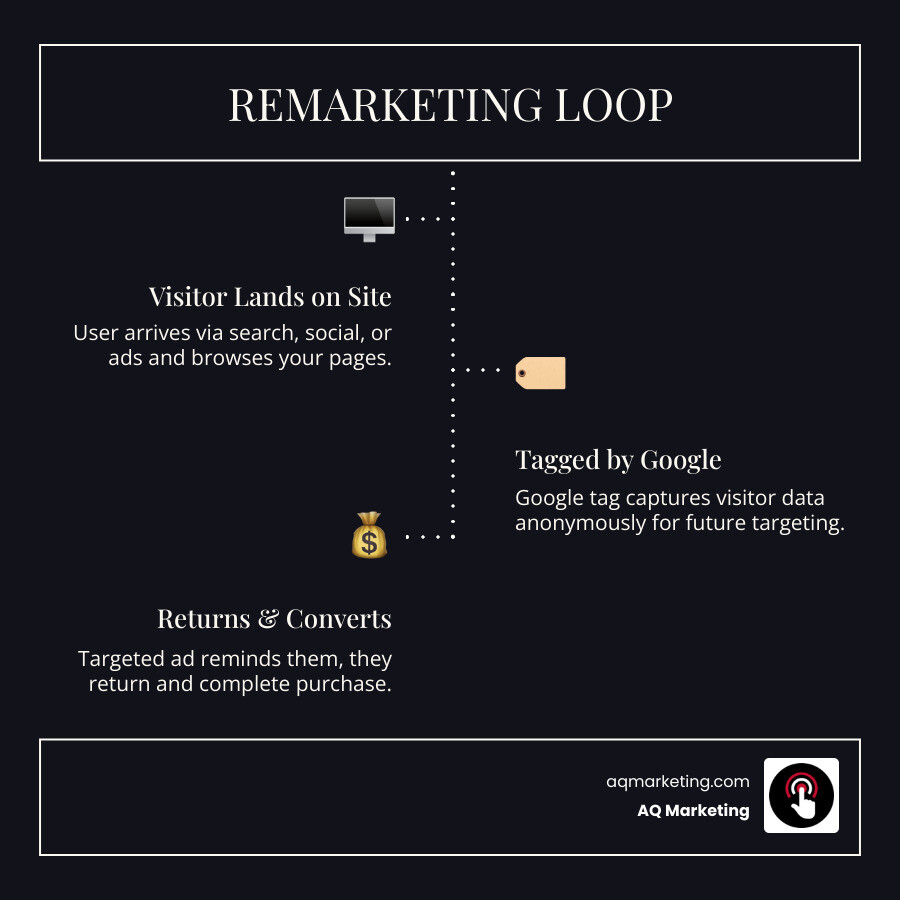
Google remarketing campaign setup is the process of tagging your website, building audience lists of past visitors, and running targeted ads to bring those visitors back to convert.
Here’s a quick overview of the core steps:
Install your Google tag on every page of your website
Build remarketing audiences in Google Ads Audience Manager (e.g., all visitors, cart abandoners, product viewers)
Create a campaign — Display, Search, Video, or Dynamic — and attach your audience lists
Design your ads with personalized messaging for each audience segment
Set bidding and frequency rules to maximize conversions without overspending
Exclude converters so you’re not wasting budget on people who already bought
Think about the last time you browsed a product online and then saw that exact product follow you around the web. That’s remarketing at work.
The numbers behind it are hard to ignore. Only 2% of website visitors make a purchase on their first visit. That means 98% leave without taking any meaningful action. For businesses investing in website traffic — through SEO, paid ads, or social media — that’s a significant amount of potential revenue walking out the door.
Remarketing gives you a second chance. By staying visible to people who already know your brand, you’re targeting the warmest audience possible — people who were already interested enough to visit.
I’m Robert P. Dickey, President and CEO of AQ Marketing, Inc., with over 20 years of experience helping small and medium-sized businesses grow through digital marketing strategies, including Google remarketing campaign setup as part of a broader paid advertising approach. I’ll walk you through everything you need to know to put this strategy to work for your business.
The Strategic Value of Re-Engaging Lost Traffic in 2026
In the current digital landscape of April 2026, the competition for attention in Massachusetts is fiercer than ever. Whether you are a home services contractor in Woburn or an insurance agency in Boston, you likely face the same reality: 98% of your prospective customers leave your site without performing a meaningful action.
This is where the ROI potential of a Google remarketing campaign setup becomes undeniable. Statistics show that retargeting campaigns enjoy 147% higher conversion rates than regular cold-traffic campaigns. Why? Because you aren’t introducing your brand to a stranger; you are reminding a “warm” lead why they visited you in the first place.
For e-commerce businesses, the stakes are even higher. Cart abandonment costs companies a staggering $18 billion annually in lost sales. Without remarketing, only about 8% of those who abandon their carts will return. However, with a strategic remarketing plan, more than one-fourth of those shoppers return to complete their purchase—a massive 225% increase in recovery.
Beyond immediate sales, remarketing is a cornerstone of Digital Advertising Services. It builds brand awareness and keeps your business “top of mind” during the long research phases common in industries like home improvement or professional services. By integrating these efforts into your Paid Search Marketing Campaigns, you ensure that every dollar spent driving initial traffic isn’t wasted when a user clicks away to check a competitor.
Essential Prerequisites for a Google remarketing campaign setup
Before we can start showing ads to previous visitors, we need to lay the technical foundation. This isn’t just about “turning on” a feature; it requires precise implementation to ensure data privacy and tracking accuracy.
The Google Tag and Gtag.js
The first step is installing the Google Tag (formerly known as the global site tag or gtag.js). This snippet of code must be placed on every single page of your website, ideally within the section. This tag is what allows Google to “see” who is visiting and assign them to your various audience lists.
Google Tag Manager (GTM)
For most of our clients from Burlington to Lexington, we recommend using Google Tag Manager. It acts as a container for all your marketing scripts. Instead of manually editing your website’s code every time you want to track a new event, you do it within the GTM interface. This ensures better browser compatibility and allows you to enable the “Conversion Linker,” which is vital for accurate tracking in a world where third-party cookies are increasingly restricted.
GA4 Linkage and Advertising Features
In 2026, Google Analytics 4 (GA4) is the primary engine for audience creation. You must link your Google Ads account to your GA4 property. Once linked, you need to enable “Google Signals” and “Advertising Features” within the GA4 admin settings. This allows Analytics to share granular audience data—like users who spent more than two minutes on a high-value service page—directly with Google Ads.
Privacy and Compliance
Before you launch, review your privacy policy. Google requires that you disclose how you use cookies and third-party tools for advertising. Especially for businesses operating in the New England area, staying transparent about data collection is not just a legal requirement; it’s a best practice for building trust. For more on the groundwork needed, see our guide on 7 Things To Do Before You Launch A Ppc Campaign.
Building High-Intent Audiences in Audience Manager
Once your tags are firing, the real magic happens in the Audience Manager. This is where we sort your traffic into segments based on their behavior. A “one-size-fits-all” ad rarely works; a user who spent five seconds on your homepage needs a different message than someone who looked at your “Kitchen Remodeling Gallery” three times.
Segmenting for a Successful Google remarketing campaign setup
Effective segmentation is the heart of Search Engine Marketing Services. We typically look for the following “High-Intent” groups:
Cart/Lead Form Abandoners: These are your “low-hanging fruit.” They started the process but didn’t finish.
High-Value Page Visitors: Users who visited your pricing page, “Contact Us” page, or specific service landing pages.
Past Converters (for Upselling): If someone hired you for a lawn cleanup in the spring, they might need snow removal in the winter.
Deep Browsers: Users who visited more than four pages or stayed on the site for more than three minutes.
Membership Duration and Custom Combinations
How long should a user stay on your list? Google allows a membership duration of up to 540 days. However, for most businesses, 30 to 90 days is the sweet spot. If your sales cycle is short (like a sandwich shop in Danvers), a 7-day list might be best. If you are selling luxury homes in Concord, you might want a 180-day list.
We also use custom combinations to refine targeting. For example, we can create a list of users who “Visited the Service Page” AND “Did Not Visit the Thank You Page.” This ensures we are only spending money on people who haven’t converted yet.
Customer Match and First-Party Data
In 2026, first-party data is king. You can upload your own encrypted email lists (Customer Match) to Google Ads. This allows you to show ads specifically to your existing database across Search, YouTube, and Gmail, providing a powerful way to encourage repeat business.
Configuring Advanced Campaign Types and Ad Creatives
With your audiences ready, it’s time to choose the right “vehicle” for your ads. A Google remarketing campaign setup can take several forms depending on your goals.
Standard vs. Dynamic Remarketing
Standard Remarketing shows static or responsive display ads to people as they browse sites across the Google Display Network (GDN). This is excellent for general brand recall.
Dynamic Remarketing takes it a step further. If a user looked at a specific leather bag on an e-commerce site, dynamic remarketing uses a business data feed to show them an ad featuring that exact bag along with its current price. This level of personalization is why dynamic ads often see much higher engagement. For technical details, Google offers a guide on how to Set up dynamic remarketing with Display, Performance ….
RLSA (Remarketing Lists for Search Ads)
RLSA doesn’t show “banner ads.” Instead, it allows you to customize your search ad campaigns for people who have previously visited your site. You can bid more aggressively on keywords when you know the searcher is already familiar with your brand, or even use broader keywords that would normally be too expensive for cold traffic.
Video and App Remarketing
Video remarketing allows you to show ads on YouTube to people who have interacted with your videos or visited your website. Given how much time people in the Boston area spend on YouTube, this is a highly “eye-catching” strategy. If your business has a mobile app, you can also set up app remarketing to drive users back into the app to complete an action.
Bidding Strategies for Google remarketing campaign setup
We generally recommend automated bidding strategies for remarketing. Strategies like Target CPA (Cost Per Acquisition) or Target ROAS (Return on Ad Spend) allow Google’s AI to adjust your bids in real-time based on the likelihood of a conversion.
To avoid “annoying” your potential customers, we always implement frequency capping. We typically start with 3-5 impressions per user per day. This keeps you visible without causing “ad fatigue,” where users start to ignore or even resent your brand. This is especially important for Ppc For Start Ups who are trying to build a positive reputation from scratch.
Frequently Asked Questions about Remarketing
What is the difference between remarketing and retargeting?
Technically, “remarketing” is an umbrella term that includes re-engaging customers via email or offline methods. “Retargeting” usually refers specifically to online display ads. However, in Google Ads, these terms are used interchangeably to describe showing ads to previous website visitors.
How many visitors are required for a remarketing list to be active?
To protect user privacy, Google has minimum list size requirements. For the Display Network, your list must have at least 100 active visitors or users within the last 30 days. For the Search Network (RLSA), the requirement is higher—at least 1,000 active visitors.
How do I troubleshoot a remarketing tag that isn’t firing?
First, check your “Audience Sources” in the Google Ads Audience Manager. If there is an issue, Google will usually flag it there. You can also use the “Google Tag Analyzer” browser extension to see if the tag is loading correctly on your live site. Common issues include tags placed outside the tags or “container” errors in Tag Manager.
Conclusion
A successful Google remarketing campaign setup is one of the most cost-effective ways to grow a small to medium-sized business in 2026. It turns your website from a “leaky bucket” into a conversion engine by recapturing the 98% of traffic that would otherwise be lost forever.
At AQ Marketing, we’ve been helping businesses in Woburn and across Massachusetts achieve long-term results since 2003. We don’t just set up ads; we build comprehensive digital transformation strategies that include SEO, web design, and high-performance lead generation.
Ready to bring your “lost” visitors back to the table? Whether you need a fresh Full-Service Digital Marketing Agency approach or just want to optimize your current PPC spend, we are here to help your business thrive in the New England market.
Is Hiring a Google Ads Company Worth It? Here’s What You Need to Know
A Google Ads company is a professional agency that manages pay-per-click (PPC) advertising campaigns on Google’s platform on behalf of businesses — helping them show up in search results, on YouTube, and across the web to drive leads and sales.
Quick answer for business owners evaluating Google Ads management:
| What You Want | What a Google Ads Company Does |
|—|—| | More leads or sales | Builds and optimizes campaigns targeting buyers actively searching | | Better ROI | Manages bids, keywords, and budgets to reduce wasted spend | | Save time | Handles research, setup, tracking, and ongoing optimization | | Measurable results | Provides transparent reporting on conversions, CPA, and ROAS | | Expert strategy | Applies certified knowledge across Search, Display, Shopping, Video, and more |
Google’s own economists estimate that businesses earn an average of $2 for every $1 spent on Google Ads. But that return doesn’t happen automatically. It takes the right strategy, the right targeting, and consistent optimization to get there.
Without professional management, many small businesses overspend on underperforming campaigns — or miss the mark entirely on reaching the right customers.
That’s where choosing the right Google Ads company makes all the difference.
I’m Robert P. Dickey, President and CEO of AQ Marketing, and over my 20+ years in digital marketing I’ve helped small and medium-sized businesses across New England navigate the complexity of finding and working with the right Google Ads company to drive real, measurable growth. In this guide, I’ll walk you through everything you need to make a confident, informed decision.
Understanding the Power of a Google Ads Company for Business Growth
When we talk about growing a business in Massachusetts—whether you are a plumber in Woburn or an insurance agency in Andover—visibility is everything. A Google Ads company acts as the bridge between your services and the customers actively searching for them. Google holds a massive 69% market share in the pay-per-click world, and in 2024 alone, Google earned $237.9 billion in advertising revenue. This isn’t just a trend; it is where the modern marketplace lives.
Google Ads allows us to place your business at the very top of the page exactly when a potential customer is looking for what you offer. This is often referred to as “high-intent” traffic. Unlike a billboard on I-93 that people drive past regardless of their needs, paid search marketing campaigns target people who are ready to take action.
There are several ways a Google Ads company can position your brand:
Search Ads: These are the classic text ads that appear at the top of search results.
Display Network: Visually engaging ads that appear while people are browsing relevant websites or apps.
Shopping Ads: Perfect for e-commerce, showing your product image and price directly in the search results.
Video Campaigns: Leveraging YouTube, where over 700 million hours of content are watched daily.
App Promotion: Driving installs for your mobile application across Google’s properties.
To get started, Google often provides incentives for new advertisers. You can learn more about Google Ads terms and conditions regarding these offers, which often include ad credits to jumpstart your first campaign.
Choosing the Right Google Ads Company Strategy
Every business has unique needs. A local HVAC company in Billerica has different goals than a boutique shop in Salem. When we sit down with a client, we first identify the primary objective: is it lead generation, online sales, or general brand awareness?
For local businesses, we often implement 5 local business SEM best practices to ensure you aren’t wasting money on clicks from people outside your service area. A professional Google Ads company will set up “geofencing” so your ads only show to people in specific towns like Lexington, Burlington, or Wilmington, ensuring every dollar of your budget is spent on a local lead.
Leveraging AI and Performance Max
The landscape of digital advertising has shifted heavily toward automation. Google’s AI now plays a massive role in how campaigns are optimized. One of the most powerful tools currently available is Performance Max.
Performance Max is an AI-powered campaign type that allows us to reach customers across all of Google’s channels—Search, YouTube, Display, Discover, Gmail, and Maps—from a single campaign. By using automated bidding and asset optimization, the AI finds the most effective ad combinations to meet your specific goals. However, while the AI is powerful, it still requires a human expert to provide the right “ingredients”—high-quality images, compelling headlines, and accurate conversion tracking—to ensure the machine produces the best possible ROI.
Key Benefits: Why Professional Management Beats Traditional Advertising
Traditional advertising, like print or radio, often feels like casting a wide net and hoping for the best. Google Ads is more like using a laser. The ability to track every single penny spent and see exactly what it produced is a game-changer for small to medium-sized businesses.
When you look at the data, the reach is undeniable. With YouTube alone accounting for 700 million hours of watch time per day, the potential for brand storytelling is vast. But beyond reach, the real benefit of a professional Google Ads company is real-time optimization. If an ad isn’t working on a Tuesday morning in Newton, we can change it by Tuesday afternoon. You can’t do that with a newspaper ad.
One of the biggest advantages of working with a Google Ads company is the speed of results. While SEO is a vital long-term strategy, it takes time to climb the organic rankings. Google Ads can put you on page one instantly.
We use precise targeting to find qualified leads based on:
Keyword Intent: Targeting “emergency plumber Woburn” vs. “how to fix a leaky faucet.”
Audience Insights: Reaching people based on their interests or past browsing habits.
Geographic Targeting: Focusing on the specific Massachusetts neighborhoods you serve.
Understanding the difference between social media ads and search ads is also crucial. Search ads capture people looking for you, while social ads introduce you to people who might like you. Both have their place, but search ads are often the fastest route to a sale.
Measurable ROI and Scalability
In PPC, we live and die by the numbers. We track metrics like:
ROAS (Return on Ad Spend): How many dollars did you make for every dollar spent?
CPA (Cost Per Acquisition): How much did it cost to get that one new customer?
Conversion Rate: What percentage of people who clicked actually called or bought?
By following 4 PPC campaign best practices, we can scale your success. If we find that a $1,000 budget is consistently returning $4,000 in revenue, we have the data to confidently increase that budget and grow your business further.
Navigating Costs and Budgeting for Your Campaigns
A common question we hear at AQ Marketing is, “How much does Google Ads cost?” The answer is that you are in full control. You set a monthly budget cap, and you only pay when someone actually clicks on your ad (Cost-Per-Click or CPC).
For new advertisers, Google often offers promotional credits. To redeem these, you typically need to sign up and meet specific spend requirements within the first 60 days. This is a great way to “test the waters” with some of Google’s money.
Industry Pricing Standards
While you pay Google for the clicks, a Google Ads company will charge a management fee to handle the strategy and optimization. Based on average online data, management fees can range anywhere from $500 to $7,500+ per month, depending on the complexity of the account and the amount of ad spend being managed.
It is important to note that the high end of the market can be 3x or more than the average, often involving performance-based models for very large corporations. For the small to medium-sized businesses we serve in Massachusetts, we focus on transparent, flat-fee or percentage-based models that align with your growth goals.
Controlling Your Ad Spend
We don’t believe in “set it and forget it.” To protect your budget, we use several tools:
Negative Keywords: Ensuring your ads don’t show for irrelevant terms (e.g., if you sell “new tires,” we make sure you don’t pay for clicks on “used tires”).
Bid Adjustments: Bidding more aggressively during your peak business hours.
Budget Caps: Ensuring you never spend a penny more than you’ve authorized for the month.
Choosing a Google Ads company is a big decision. You are handing over your hard-earned marketing budget to someone else. You should look for partners who value transparency and data ownership.
At AQ Marketing, we believe you should always own your Google Ads account. If you ever decide to move on, your data and history should stay with you. We also prioritize becoming a Google Partner to ensure we are always up to date on the latest platform changes.
Identifying a Certified Google Ads Company Partner
Google has a formal program to vet agencies.
Google Partners: These agencies have passed certification exams (via Skillshop) and meet Google’s performance requirements.
Premier Partners: This is the top tier, representing the top 3% of participating companies in a given country. They often have higher spend thresholds and direct access to specialized Google support.
When looking for an agency, check for these badges. They signify that the Google Ads company has a proven track record of delivering results and follows Google’s best practices. You can learn more about working with a Google Partner to understand the strategic benefits they bring to your business.
Essential Questions for Your Google Ads Company
Before signing a contract, ask these five questions:
How often will I receive reports? You should expect detailed monthly reports that explain what happened and what the plan is for next month.
What is your fee structure? Is it a flat fee, a percentage of spend, or performance-based?
How do you track conversions? They should be using GA4 (Google Analytics 4) or server-side tracking to ensure every lead is captured.
Do you work with my competitors? Ensure there isn’t a conflict of interest in your local town.
Who owns the data? Always ensure you have administrative access to your own account.
Frequently Asked Questions about Google Ads
How long does it take to see results from a campaign?
While your ads can go live almost immediately, there is usually a “learning period” for Google’s AI. We typically tell our clients in Woburn or Burlington to expect a 30-day optimization phase where we gather data and refine the targeting before the campaign truly begins to scale.
Can I manage my own Google Ads account?
Technically, yes. However, it is a significant time investment. Between keyword research, writing ad copy, monitoring bids, and staying on top of platform updates, it can easily become a full-time job. Most business owners find that the “wasted spend” from a DIY account costs more than the fee to hire a professional Google Ads company.
What is the difference between a Partner and a Premier Partner?
A Google Partner meets the basic requirements for spend, performance, and certification. A Premier Partner is recognized as being in the top 3% of agencies in their country. Both are great, but Premier Partners often have access to more advanced training and beta features from Google.
Conclusion
Navigating online advertising doesn’t have to be overwhelming. By choosing a transparent, certified Google Ads company, you can turn search engines into a predictable engine for business growth. At AQ Marketing, we’ve spent two decades helping Massachusetts businesses achieve long-term, impactful results through expert digital strategy.
Link existing accounts (Google Business Profile, YouTube)
Switch to Expert Mode to avoid automatic Smart Campaign lock-in
Choose your time zone, billing country, and currency (these cannot be changed later)
Set up billing with a credit card, PayPal, or bank account
Skip or create your first campaign and submit
It sounds straightforward — but there are several settings that are permanent, and a few default options that can quietly limit your control before your first ad ever runs.
Google Ads operates on a pay-per-click (PPC) model, meaning you only pay when someone clicks your ad. Your ads can appear across Google Search, Google Maps, YouTube, Gmail, and millions of partner sites. The system is powerful, but only if your account is configured correctly from the start.
I’m Robert P. Dickey, President and CEO of AQ Marketing — a digital marketing agency with over 20 years of experience helping small and mid-sized businesses navigate Google Ads account setup and paid advertising strategy. I’ll walk you through everything you need to know to get it done right the first time.
Strategic Prerequisites for Google Ads Account Setup
Before we even click “Start Now,” we need to make sure your business is actually ready for the traffic Google is about to send your way. At AQ Marketing, we’ve seen plenty of businesses in Woburn and Burlington rush into Google Ads account setup only to realize their website isn’t prepared to turn those clicks into customers.
Website Readiness and Landing Page Relevance
Your website is your digital storefront. If a customer clicks an ad for “insurance services in Boston” and lands on a generic home page that doesn’t mention insurance, they’ll leave immediately. This is why landing page relevance is critical. A high-converting page should have a clear headline, an obvious call-to-action (CTA), and content that mirrors the ad the user just clicked.
What do you want people to do? If you don’t define this, you’re just buying clicks with no way to measure success. Whether it’s a form fill, a phone call, or a direct purchase, you must identify these “conversions” before you launch. If you’re new to these terms, the PPC 101: The Beginner’s Guide to PPC is an excellent resource for getting up to speed.
Google Account Requirements
You’ll need a standard Google account (like a Gmail address) to get started. We recommend using a business-specific email rather than a personal one. This keeps your professional assets separate and makes it easier if you ever need to grant access to an agency or partner.
Defining Your Conversion Goals
We often help home service businesses in towns like Lexington and Concord set up their goals. Common goals include:
Lead generation: Capturing names and emails via a contact form.
E-commerce tracking: Measuring direct sales on your site.
Phone call attribution: Tracking how many people called your business directly from the ad.
Preparing Your Business Information
During the Google Ads account setup, Google will ask for your legal business name and website URL. It’s also highly beneficial to link your Google Business Profile at this stage. This integration allows your ads to show your local address and phone number, which is a game-changer for Getting Local Paid Search Right: How to Achieve ROAS.
Choosing Between Individual and Manager Accounts
One of the first forks in the road is deciding which type of account you actually need. Most small business owners only need a standard individual account. However, if you plan on running multiple businesses or if you are an internal marketer managing several brands, you might consider a Manager account (MCC).
Standard Account vs. Manager Account (MCC)
A standard account is where the actual advertising happens. You create campaigns, set budgets, and write ads here. A Manager Account (or My Client Center) is an umbrella account. It doesn’t run ads itself; instead, it “holds” and manages multiple individual accounts.
Feature
Individual Account
Manager Account (MCC)
Primary Use
Running ads for one business
Managing multiple sub-accounts
Campaign Creation
Yes
No (only via sub-accounts)
Billing
Individual billing profile
Centralized or individual billing
Account Limit
1 per email usually
Up to 20 per email address
Scaling with a Google Ads Account Setup for Agencies
For those looking to scale, manager accounts allow for centralized reporting and simplified access management. You can even Create Google Ads accounts via API if you’re building custom software integrations.
That manager accounts are included in your limit of 20 Google Ads accounts per email address. Also, be aware of the “use it or lose it” rule: accounts created from manager accounts will be canceled if they’ve been inactive for more than 120 days.
Critical Settings and Expert Mode Configuration
This is where many people get tripped up. Google wants to make things “easy,” but easy often means giving up control over your budget.
The “Expert Mode” Secret
When you first start your Google Ads account setup, Google will likely funnel you into “Smart Mode.” This is a simplified version designed for beginners, but it limits your ability to pick specific keywords or control bidding strategies. We always recommend clicking the link that says “Switch to Expert Mode” at the bottom of the setup screen. This unlocks the full power of the platform.
There are three settings you must get right the first time because Google does not allow you to change them later:
Time Zone: This affects your reporting and when your ads start/stop each day.
Currency: This is how you will be billed.
Billing Country: This determines which payment methods are available to you.
If you make a mistake here, you’ll likely have to close the account and start over from scratch, which is a massive headache.
Avoiding Common Pitfalls in Google Ads Account Setup
One common mistake is letting Google “automatically” create your first campaign. Often, these defaults lead to “Smart Campaigns” that cast too wide a net. We suggest skipping the initial campaign creation during the setup flow if you aren’t ready with your keyword research. This prevents you from spending money on poorly targeted traffic while you’re still getting organized.
Google accepts most major credit cards, PayPal, and in some cases, direct bank transfers. When you add a card, Google may place a temporary authorization charge to verify the account, which usually disappears within a week.
One important thing to understand is the 30.4 day budget cycle. Google will attempt to make your monthly spend average out to your daily budget across 30.4 days. This means on some days, Google might spend up to double your daily budget if it sees high-quality traffic, but it will never exceed your monthly “ceiling.” Always review the Terms and conditions for ad credits if you have a promotional code, as you usually need to spend a certain amount before the credit kicks in.
Post-Setup Verification and Quality Score Foundations
Once the account is created, you aren’t quite “live” yet. Google has become much stricter about security and identity in recent years.
Verification and Security
You will likely be asked to complete Identity Verification. This may involve uploading business documents or responding to a postcard sent to your physical business address in Woburn or elsewhere. Do not ignore these requests! If you fail to verify within the allotted time, Google will pause your account.
We also strongly recommend enabling Two-Factor Authentication (2FA). Given that your credit card is linked to this account, you want to ensure it’s as secure as possible.
Building “Street Cred”
Your account doesn’t start with a perfect reputation. It typically takes 4-6 weeks to establish strong Google “street cred.” During this time, Google is watching how users interact with your ads. If you provide a great experience, your Quality Scores will improve, which actually lowers your cost-per-click (CPC) over time. You can learn more about maximizing your budget in this Hacking Google Ads Guide.
Finalizing Your Google Ads Account Setup with Conversion Tracking
The final step of a professional setup is linking your other Google assets. You should link your Google Analytics account immediately. This allows data to flow back and forth, giving you a much clearer picture of what happens after someone clicks your ad.
If you’re also running social ads, you’ll want to ensure your tracking is consistent across platforms. Our Facebook Ad Campaign Analysis explains why cross-channel data is so valuable.
Frequently Asked Questions about Google Ads Setup
Can I change my account’s time zone or currency after setup?
No. As mentioned earlier, these settings are permanent. They are tied to how Google’s servers calculate your billing and reporting. If you move your business from Boston to London and need to change currencies, you will have to create a brand-new account and migrate your campaigns.
How much does it typically cost to start advertising on Google?
The cost varies wildly based on your industry and location. In the Boston area, highly competitive fields like law or home restoration will have much higher costs than niche retail.
Based on average online data, most small to medium businesses see monthly spends ranging from $1,000 to over $10,000. To provide a realistic spread, some national brands might spend $30,000 or more per month in the same category.
Note: This pricing is based on average online data and does not represent AQ Marketing’s actual pricing.
Should I create my first campaign during the initial setup process?
Generally, no—unless you have already done your keyword research and have your ad copy ready. Google’s setup wizard tends to push you toward “Smart” defaults that might not be optimal for your specific goals. It’s better to finish the Google Ads account setup first, switch to Expert Mode, and then build your campaign with a clear strategy in mind.
Conclusion
A successful Google Ads account setup is about more than just filling out a few forms; it’s about building a stable foundation for your business’s digital growth. By choosing Expert Mode, getting your permanent settings right, and ensuring your website is ready for traffic, you’re already ahead of most of your competitors.
At AQ Marketing, we’ve been helping businesses in Woburn and throughout Massachusetts achieve long-term, impactful results since 2003. Whether you’re in home services, insurance, or any other industry, we understand the local market and the technical nuances of PPC.
If you’re ready to stop guessing and start growing, we’re here to help. Explore our Full-Service Digital Marketing Agency options to see how we can take your online presence to the next level.
Is Hiring a Google Advertising Agency Worth It for Your Business?
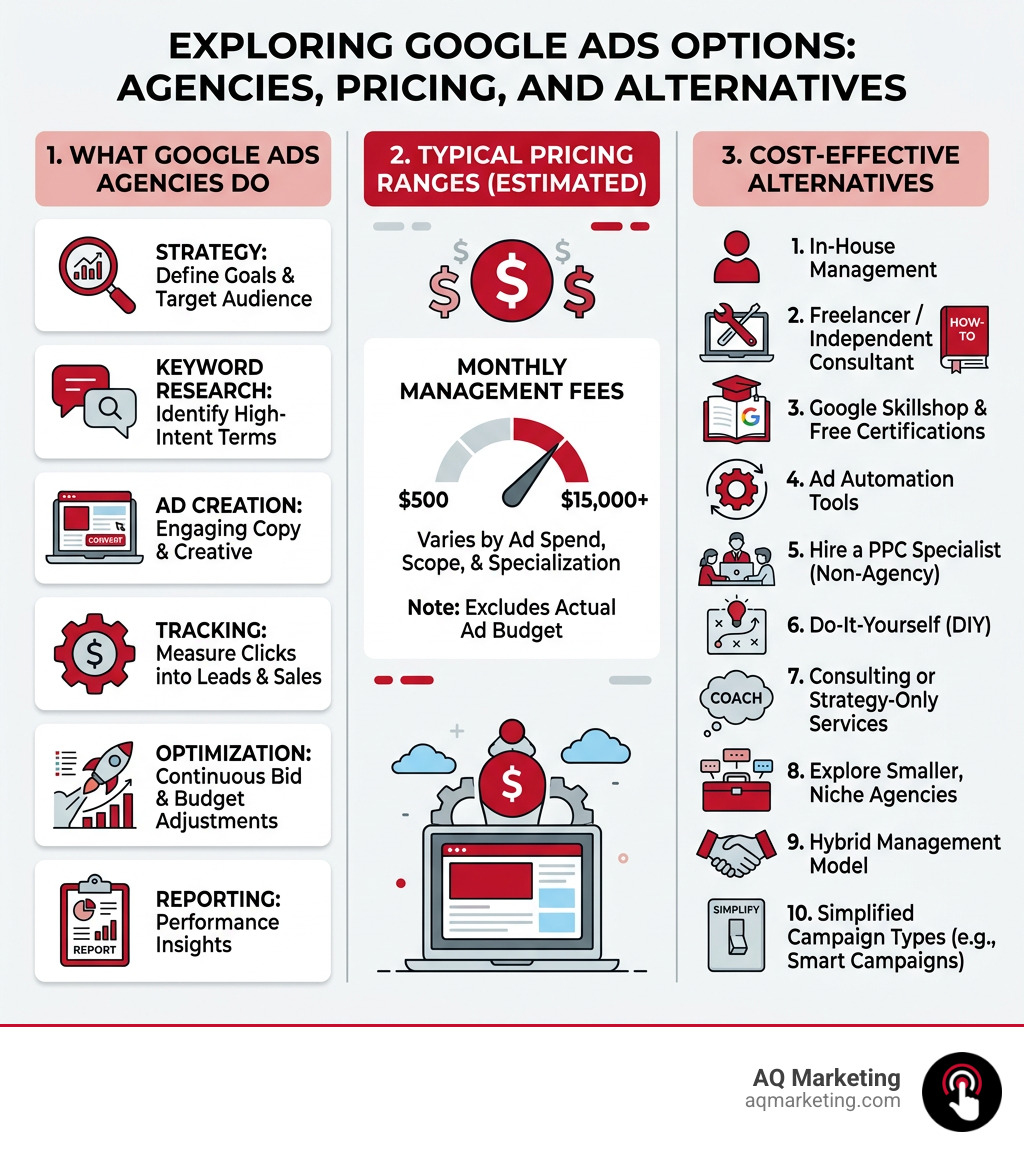
A google advertising agency helps businesses plan, launch, and manage paid ad campaigns on Google’s platforms — including Search, Display, Shopping, and Performance Max.
Here’s a quick breakdown of what these agencies typically do:
Campaign strategy — setting goals, budgets, and targeting
Keyword research — finding high-intent search terms your customers use
Ad creation — writing copy and building creatives that convert
Conversion tracking — measuring which clicks turn into leads or sales
Ongoing optimization — adjusting bids, keywords, and audiences to improve ROI
Reporting — showing you what’s working and what isn’t
The catch? Top-tier agencies can be expensive. Monthly management fees typically range anywhere from $500 to $15,000+ depending on ad spend, scope, and specialization — and that’s before your actual ad budget.
For small and medium-sized businesses, those costs can add up fast. That’s exactly why it’s worth knowing your options before signing a contract.
I’m Robert P. Dickey, President and CEO of AQ Marketing, and with over 20 years of experience in digital marketing — including managing Google Advertising (PPC) campaigns for small and mid-sized businesses across New England — I’ve seen what works, what doesn’t, and where businesses overpay for a google advertising agency. I’ll walk you through 10 cost-effective alternatives so you can make the smartest choice for your budget and goals.
When you partner with a google advertising agency, you are essentially hiring a team of specialists to navigate the increasingly complex world of paid search. It isn’t just about “buying ads”; it is about engineering a system that turns a searcher in Abington or Woburn into a paying customer.
The core of their role involves deep campaign strategy. This starts with identifying exactly who your audience is and where they live online. For a local plumber in Newton or an insurance agent in Worcester, this means Targeted PPC Advertising that focuses on high-intent local searches.
Key Services Provided
Keyword Research: This is the foundation. Agencies look for terms with high commercial intent while avoiding “junk” traffic that eats your budget.
Ad Creative: Writing compelling copy that stands out in a crowded Search Engine Results Page (SERP).
Landing Page Optimization: A click is useless if the website is confusing. The best agencies ensure your landing page matches the ad’s promise.
Remarketing: Using Facebook Retargeting Ads or Google Display to stay in front of people who visited your site but didn’t convert yet.
Conversion Tracking: Setting up tools like GA4 to ensure every dollar spent is accounted for.
10 Cost-Effective Alternatives to High-End Agencies
If the five-figure monthly retainers of national firms don’t fit your Massachusetts small business budget, don’t worry. There are several ways to get professional results without the “big agency” price tag.
1. Freelance PPC Specialists
Individual freelancers often have the same certifications as agency staffers but lower overhead. You can often find experts who charge by the hour or a flat project fee for setup.
2. Niche-Specific Boutique Agencies
Instead of a generalist google advertising agency, look for a boutique Search Engine Marketing Agency that specializes in your specific industry, such as home services or legal. They often have pre-built keyword lists and proven strategies that save time and money.
3. Automated Bidding Software
Tools that use AI to manage bids can sometimes replace the need for a daily human manager. However, be careful—machine learning is only as good as the data you feed it.
4. Focused Retargeting Campaigns
Sometimes you don’t need a full-funnel strategy. Running Facebook Retargeting Ads to capture “lost” visitors can be a very low-cost way to increase sales compared to expensive top-of-funnel search terms.
5. YouTube Ad Specialists
Video can be significantly cheaper than search ads in terms of cost-per-view. Following a Youtube Ads Marketing Complete Guide can help you launch low-cost awareness campaigns.
6. Local SEO and Google Business Profile
Before spending thousands on ads, ensure your Google Business Profile Marketing is optimized. For many businesses in towns like Salem or Plymouth, appearing in the “Map Pack” provides free leads that rival paid ads.
7. Performance-Based Partnerships
Some smaller Digital Advertising Services offer models where they take a percentage of the revenue generated or a fee-per-lead, aligning their success directly with yours.
8. Hybrid In-House Management
You can hire an agency for the initial Targeted Pay-Per-Click Advertising setup and then have a trained staff member handle the weekly maintenance.
9. Specialized Landing Page Tools
Instead of paying an agency for web design, use high-conversion templates to improve your “Quality Score,” which naturally lowers your ad costs.
10. AI-Driven “Lite” Management
Many platforms now offer AI-managed versions of Google Ads. While less customizable, they are often much cheaper than a full-service google advertising agency.
Comparing Costs: Agency vs. Alternatives
Service Level
Typical Monthly Fee (Avg)
High-End Range
Best For
National Agency
$2,500
$15,000+
Enterprise Brands
Boutique Local Agency
$1,000
$4,000
Small/Medium Businesses
Freelancer
$500
$2,000
Startups/Small Projects
DIY with Software
$150
$600
Micro-businesses
Note: Pricing listed is based on average online data and does not represent AQ Marketing’s actual pricing.
Modern Challenges for a Google Advertising Agency
The world of Google Ads has changed drastically in the last few years. It isn’t just about picking the right keywords anymore; it’s about managing data and AI.
The Push for Automation
Google has been heavily pushing Performance Max (PMax) and broad-match keywords. While this makes it easier to start, it often leads to wasted spend if you don’t have “guardrails” in place. A smart google advertising agency knows when to trust Google’s AI and when to stick to 4 PPC Campaign Best Practices like manual keyword control.
Server-Side Tracking and Privacy
With the decline of third-party cookies, traditional “pixel” tracking is becoming less accurate. Top agencies are moving toward server-side tracking using Google Tag Manager (GTM) to ensure they aren’t missing conversion data. This is vital for maintaining a high ROI in 2024 and beyond.
Google Partners Program
When looking for help, you’ll often see the Google Partner badge. This program performs reviews on company information, checking for things like malware and trademark compliance. You can verify a company’s status on the official Company details for Google Partners page.
Frequently Asked Questions
Is a Google advertising agency worth the investment?
Yes, but it depends on your goals. If your business relies on a steady stream of new leads, the expertise of an agency can significantly improve your “Expert Score” and ROI. For example, research shows that professional management can often recover more in “wasted spend” (clicks that don’t convert) than the cost of the management fee itself. If you are spending more than $2,000 a month on ads, professional Digital Advertising Services usually pay for themselves.
What are common red flags when hiring a Google advertising agency?
Watch out for agencies that:
Guarantee #1 Rankings: No one can guarantee the top spot in an auction every time.
Hide Your Data: You should always own your Google Ads account. If they won’t give you admin access, walk away.
Lack of Conversion Tracking: If they can’t show you exactly how many leads or sales came from your Targeted PPC Advertising, they aren’t doing their job.
Long Contracts with No Exit: Avoid being locked into 12-month terms without a performance-based out-clause.
How long does it take to see results from a professional campaign?
While your ads can go live in 24 hours, we typically recommend a 90-day window for true optimization.
Month 1: Data collection and testing.
Month 2: Identifying winning keywords and pausing losers.
Month 3: Scaling what works to maximize ROI.
A professional Targeted Pay-Per-Click Advertising campaign needs time to improve its “Quality Score,” which lowers your costs over time.
Conclusion
Choosing the right path for your Google Ads doesn’t have to be a choice between “expensive” and “ineffective.” Whether you choose a full-service google advertising agency, a local boutique partner, or a hybrid approach, the key is focusing on long-term, impactful results.
At AQ Marketing, we’ve spent two decades helping businesses in Woburn, Boston, and throughout Massachusetts navigate the digital landscape. We focus on Digital Marketing Services that actually move the needle—from SEO and web design to high-performance Google Ads management.
Ready to stop wasting ad spend and start growing? Let’s talk about how we can transform your online presence.
A Google Ads agency Boston businesses can trust will help you show up at the exact moment local customers are searching for what you offer — and turn those clicks into real leads or sales.
If you’re looking for a quick answer, here are the key things to know about working with a Boston Google Ads agency:
What they do: Manage PPC campaigns on Google — including Search, Display, Shopping, and YouTube ads — to drive targeted traffic and conversions.
Who they serve: Small and mid-sized businesses in industries like home services, healthcare, legal, e-commerce, and SaaS.
What results look like: Agencies regularly report outcomes like 36% average conversion increases and 50% average drops in cost per conversion.
What it costs: Monthly management fees typically range from $600 to $6,000 depending on scope and ad spend. (Pricing is based on average online data and does not represent AQ Marketing’s actual pricing.)
What to look for: Google Partner certification, transparent reporting, local market knowledge, and a track record of measurable results.
Boston is one of the most competitive digital markets in New England. With a highly educated, tech-savvy population and industries ranging from biotech to home services all fighting for the same search real estate, running Google Ads without a clear strategy is a fast way to burn through budget with little to show for it.
That’s why the right local expertise matters.
I’m Robert P. Dickey, President and CEO of AQ Marketing, Inc., based in Woburn, MA — and with over 20 years helping small and medium-sized businesses navigate digital marketing, I’ve seen what separates a high-performing Google Ads agency Boston campaign from one that simply drains your budget. In the sections below, I’ll walk you through exactly what to look for, what to expect, and how to get the most out of Google Ads in the Greater Boston market.
When you partner with a Google Ads agency Boston, you aren’t just paying someone to “turn on” ads. You are hiring a team to build a sophisticated engine that drives revenue. In a city like Boston, where every click can cost a premium, the quality of management makes the difference between profit and loss.
A comprehensive agency provides several layers of service:
PPC Management: This is the day-to-day “heavy lifting.” It involves adjusting bids, testing different ad variations, and ensuring your budget is being spent during the hours when your customers are most likely to convert.
Keyword Research: Understanding The Power of Keyword Research is the foundation of any campaign. We don’t just look for high-volume terms; we look for “transactional intent.” For a contractor in Newton or an insurance agent in Reading, we find the specific phrases local customers use when they are ready to buy.
Audience Targeting: Google allows us to target users based on their interests, demographics, and even their physical location. A local expert knows how to geofence your ads so you aren’t paying for clicks in Worcester if your service area is strictly the North Shore.
Ad Creation: Crafting compelling ad text requires skill. We focus on Targeted Pay-Per-Click Advertising that speaks directly to the pain points of Massachusetts residents.
Bid Optimization & Tracking: We use data to determine exactly how much to pay for a click to stay competitive without overspending. By setting up rigorous conversion tracking, we can see exactly which ads led to a phone call or a form submission.
Account Auditing: Many businesses come to us with existing accounts that are “leaking” money. A professional audit identifies wasted spend—often saving clients 10% to 15% immediately by cutting out bot traffic and irrelevant search terms.
Landing Page Optimization: An ad is only as good as the page it sends people to. We ensure your landing pages are fast, mobile-responsive, and have clear calls to action (CTAs).
The Strategic Advantage of Local Boston Expertise
Why choose a local Google Ads agency Boston over a massive national firm? It comes down to “boots on the ground” knowledge. Boston isn’t just one big market; it’s a collection of unique neighborhoods and suburbs, each with its own consumer behavior.
A local expert understands that a homeowner in the Back Bay has different needs and search habits than a business owner in Burlington or a family in Andover. By working with a Digital Marketing Agency Andover MA, you gain an ally who understands the local landscape, the seasonal shifts in New England business, and the specific competitive pressures of the Massachusetts market.
Local agencies are relationship-focused. We aren’t hidden behind a 1-800 number. We are part of the same community, which means we are more accountable for your results. Proximity allows for better communication and a deeper understanding of your specific business goals.
Maximizing ROI with a Google Ads agency Boston
The ultimate goal of any advertising campaign is Return on Investment (ROI). In Google Ads, this is often measured as ROAS (Return on Ad Spend).
Hiring a PPC Management Firm: 5 Reasons Why You Should often leads to better ROI because professionals know how to prioritize “Lead Quality” over “Lead Quantity.” It’s better to have 10 clicks that result in 2 high-value sales than 100 clicks that result in nothing but a high bill.
We use data-driven decisions and competitive analysis to see what your rivals are doing and how to outmaneuver them. This includes fraud protection. Did you know that up to 15% of ad spend can be wasted on “spam clicks” from bots or even competitors? A top-tier agency uses tools to block these clicks, ensuring your budget goes toward real human beings in the Boston area.
Specialized Campaign Types for Massachusetts Businesses
Google Ads is much more than just the text ads you see at the top of a search result. Depending on your industry—whether you’re a plumber in Medford or a tech startup in Cambridge—different campaign types will yield better results.
Search Campaigns: These are the classic text ads. They appear when someone searches for a specific term. We also utilize Search partners: Definition to extend your reach to other sites.
Display Ads: These are visual banner ads that appear on websites across the internet. They are fantastic for building brand awareness.
Remarketing: Ever visited a website and then saw their ads everywhere you went? That’s remarketing. How Does Google Remarketing Work? is a powerful way to re-engage people who visited your site but didn’t contact you the first time.
Shopping Ads: Essential for e-commerce businesses, these show your product image and price directly in the search results.
Performance Max: A newer, AI-driven campaign type that combines Search, Display, and YouTube to find customers wherever they are in their journey.
YouTube Advertising: With video consumption at an all-time high, YouTube is a cost-effective way to get your brand in front of a local audience.
Local Service Ads (LSAs): These are the “Google Guaranteed” ads at the very top of the page for home service providers like electricians and locksmiths. They operate on a pay-per-lead basis rather than pay-per-click.
Understanding Social Media Ads vs Search Ads: What’s the Difference? is also key. Search ads capture people who are actively looking for a solution right now, making them incredibly powerful for generating immediate leads.
Understanding Costs and Performance Metrics
One of the most common questions we hear is: “How much does this cost?” It is important to distinguish between your ad spend (what you pay Google) and your management fee (what you pay the agency).
Pricing Model
Description
Typical Range
Flat Monthly Fee
A set price regardless of ad spend.
$600 – $3,000+
Percentage of Spend
Agency fee is a % of your total Google budget.
10% – 20%
Hybrid Model
A base flat fee plus a smaller % of spend.
Varies
Note: Pricing listed is based on average online data and does not represent AQ Marketing’s actual pricing. Typical monthly management fees range from $600 to $6,000 depending on complexity.
CPA (Cost Per Acquisition): How much does it cost to get one new customer?
ROAS: For every dollar spent, how many dollars did you make back?
Quality Score: A Google metric (1-10) that measures how relevant your ads and landing pages are. A higher score means lower costs and better ad positions.
Choosing the Right Google Ads agency Boston for Your Business
Selecting the right partner is a big decision. You want an agency that treats your budget like their own. Here is what to look for:
Google Partner Certification: This means the agency has met Google’s standards for performance, spend, and certification. It ensures they are up-to-date on the latest tools and features.
Industry Experience: Do they understand the home services or insurance industries? Experience in your specific niche means they already know which keywords work and which don’t.
Transparent Reporting: You should never have to wonder where your money is going. Look for agencies that provide clear, easy-to-read monthly reports.
Communication: How often will you talk? A good agency provides regular strategy calls to review performance and plan for the next month.
No Long-Term Contracts: Reputable agencies should earn your business every month. Be wary of anyone trying to lock you into a year-long contract without proven results first.
Conclusion
At AQ Marketing, we believe that Google Ads is one of the most powerful tools available for small business growth in Massachusetts. From our home base in Woburn, we’ve helped businesses across the state—from Boston to Burlington and beyond—achieve long-term, impactful results.
Success in digital marketing isn’t about “set it and forget it.” It requires constant optimization, local market knowledge, and a commitment to data. Whether you are looking to launch your first campaign or rescue an underperforming account, a dedicated Google Ads agency Boston expert can help you turn your marketing spend into a predictable engine for growth.
If you are ready to stop guessing and start growing, Pay-Per-Click Advertising managed by local experts is the fastest way to get there.
How long does it take to see results from Google Ads?
One of the biggest benefits of Google Ads is that it provides immediate traffic. Your ads can be live and appearing in front of customers within hours of a campaign launch. However, achieving sustainable profitability usually takes a bit longer.
The first 30 to 90 days are often considered the “learning phase.” During this time, we collect data on which keywords are converting and which are just wasting money. By the 90-day mark, most businesses see a clear path to ROI, allowing us to begin campaign scaling—increasing the budget for the ads that are performing best to drive even more revenue.
Is Google Ads better than SEO for my business?
It’s not necessarily a matter of one being “better” than the other; they serve different purposes. Google Ads provides instant visibility. If you need leads today, PPC is the answer. SEO (Search Engine Optimization) is a long-term strategy for organic growth. It takes longer to see results, but the traffic it generates is essentially “free” once you’ve earned your ranking.
When we look at Social Media Ads vs Search Ads: What’s the Difference? 2, we see that search-based marketing (both SEO and Google Ads) is unique because it targets search intent. The user is actively looking for you. An integrated marketing strategy that uses both Google Ads for immediate results and SEO for long-term stability is usually the most effective approach for Boston businesses.
What is a Google Partner and why does it matter?
A Google Partner is an agency that has been officially recognized by Google for its expertise and success in managing ad accounts. To earn this badge, an agency must:
Maintain a high level of performance for their clients.
Meet a minimum ad spend requirement across their managed accounts.
Have staff members who have passed Google Ads certification exams in multiple areas (Search, Display, Video, etc.).
Working with a Partner ensures you are working with masters of the platform who have direct access to Google support and early access to new advertising features. It’s a mark of trust that your budget is in capable hands.