Understanding PPC Marketing vs. SEO and SEM
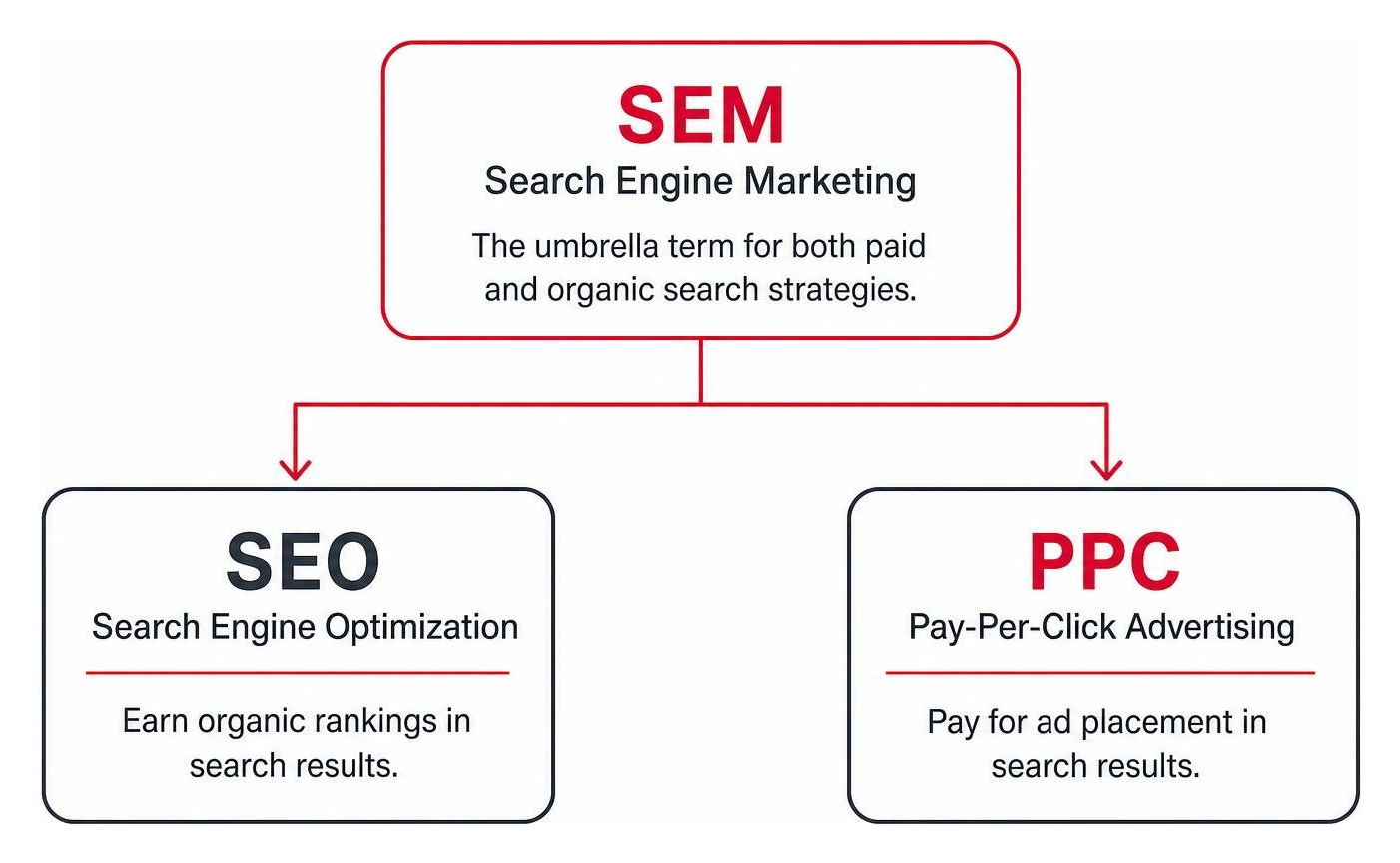
Navigating digital marketing can feel like learning a whole new language. To get the most out of your ad dollars, it helps to understand how pay-per-click (PPC) fits alongside Search Engine Optimization (SEO) and Search Engine Marketing (SEM).
At its core, PPC is an advertising model where you pay a platform every time a searcher clicks your ad. What is Pay Per Click explains how this direct fee model grants immediate entry to top-of-page search results.
SEO, on the other hand, focuses on earning free organic search rankings through high-quality content, solid web architecture, and backlinks. While SEO builds long-term authority, it takes time to show results.
SEM is the umbrella term that covers both paid search (PPC) and organic search (SEO). To see how these channels complement one another, read our full breakdown on SEO vs PPC: What's the Difference?.
Pros and Cons of PPC Advertising for SMBs
For small and medium-sized businesses across Massachusetts, PPC search advertising offers powerful growth opportunities alongside real budget responsibilities.
Pros:
- Immediate Search Visibility: Unlike organic ranking efforts that build over months, launching a pay per click keyword campaign places your business at the top of search results right away.
- Granular Budget Control: You can set strict daily spend caps. Platforms allow businesses to start testing campaigns with as little as $5 per day with no minimum spend requirements.
- Measurable ROI: Every click, phone call, and contact form submission can be tied back to specific search terms, giving you full visibility into what’s working.
Cons:
- Ongoing Spend: Once you pause your campaign or exhaust your daily budget, your ad visibility stops immediately.
- Competitive Bidding: High-demand service categories can drive up cost-per-click rates, requiring active management to prevent wasted ad spend.
How to Master Pay Per Click Keyword Selection and Match Types
Choosing effective keywords isn't about collecting hundreds of random terms; it's about matching searcher intent. Grouping search queries by intent allows you to separate casual researchers from active buyers ready to hire a contractor or buy a service. Focus heavily on high-intent, long-tail phrases (typically 3 to 4 words) which carry higher conversion rates and often lower competition than generic single-word searches. Check out our PPC Targeting Ultimate Guide for deeper audience strategies.
Match types tell ad platforms how closely a user's search query must match your selected pay per click keyword before your ad enters the auction.
| Match Type | Google Ads Syntax | Reach | Specificity | Wasted Spend Risk |
|---|---|---|---|---|
| Broad Match | keyword |
Maximum | Low | High |
| Phrase Match | "keyword" |
Moderate | High | Moderate |
| Exact Match | [keyword] |
Targeted | Maximum | Low |
Strategic Matching Rules for Your Pay Per Click Keyword List
Using match types strategically keeps your budget focused on qualified prospects:
- Broad Match: Matches your query to broad concepts and related searches. While it yields maximum exposure, it carries a higher risk of triggering ads on irrelevant terms if left unmonitored.
- Phrase Match: Includes the meaning of your search phrase. Ads show on searches that include the core intent of your term, offering a balanced mix of volume and lead control.
- Exact Match: Matches the specific intent of your phrase directly. Exact match gives you tight control over who sees your ads, ensuring high ad relevance.
- Close Variants: Ad networks automatically show your ads on close variants—including misspellings, singular or plural forms, and abbreviations—regardless of the match type selected.
Negative Keywords and Bid Refinement Strategies
Negative keywords block your ads from triggering on queries that won't produce business. For example, if you offer premium roofing services, adding terms like "free," "DIY," "jobs," or "cheap" as negative keywords keeps casual searchers from draining your budget. Adding at least three targeted negative keywords per ad group is a smart baseline practice.
To keep costs under control, read Google's guidance on Refining your keywords and bids. You can also adopt automated bidding strategies like Target CPA (Cost Per Acquisition) to auto-adjust bids in real time once your account hits steady conversion volumes (typically 50 conversions per month).
Conducting Keyword Research and Forecasts with Google Keyword Planner

Google Keyword Planner is a free resource inside Google Ads built to help businesses discover search terms, inspect volume trends, and build baseline ad budgets. You can begin by entering seed words related to your core services or scanning your business domain URL. You can also review Google's official documentation on how to Research Keywords for Campaigns with Keyword Planner.
Evaluating Forecasts to Estimate Clicks, Impressions, and Costs
Keyword Planner provides predictive performance forecasts based on recent 7- to 10-day search trends and seasonal adjustments. To learn how these traffic projections are calculated, review Google's guide About Keyword Planner forecasts.
These tools let you adjust bid sliders and daily budget caps to model projected clicks, impressions, and estimated costs before spending real ad dollars. That search volume historical data is always displayed using exact match metrics, regardless of which match type you select for your plan.
Calculating Cost-Per-Click: Average CPC vs. Maximum CPC
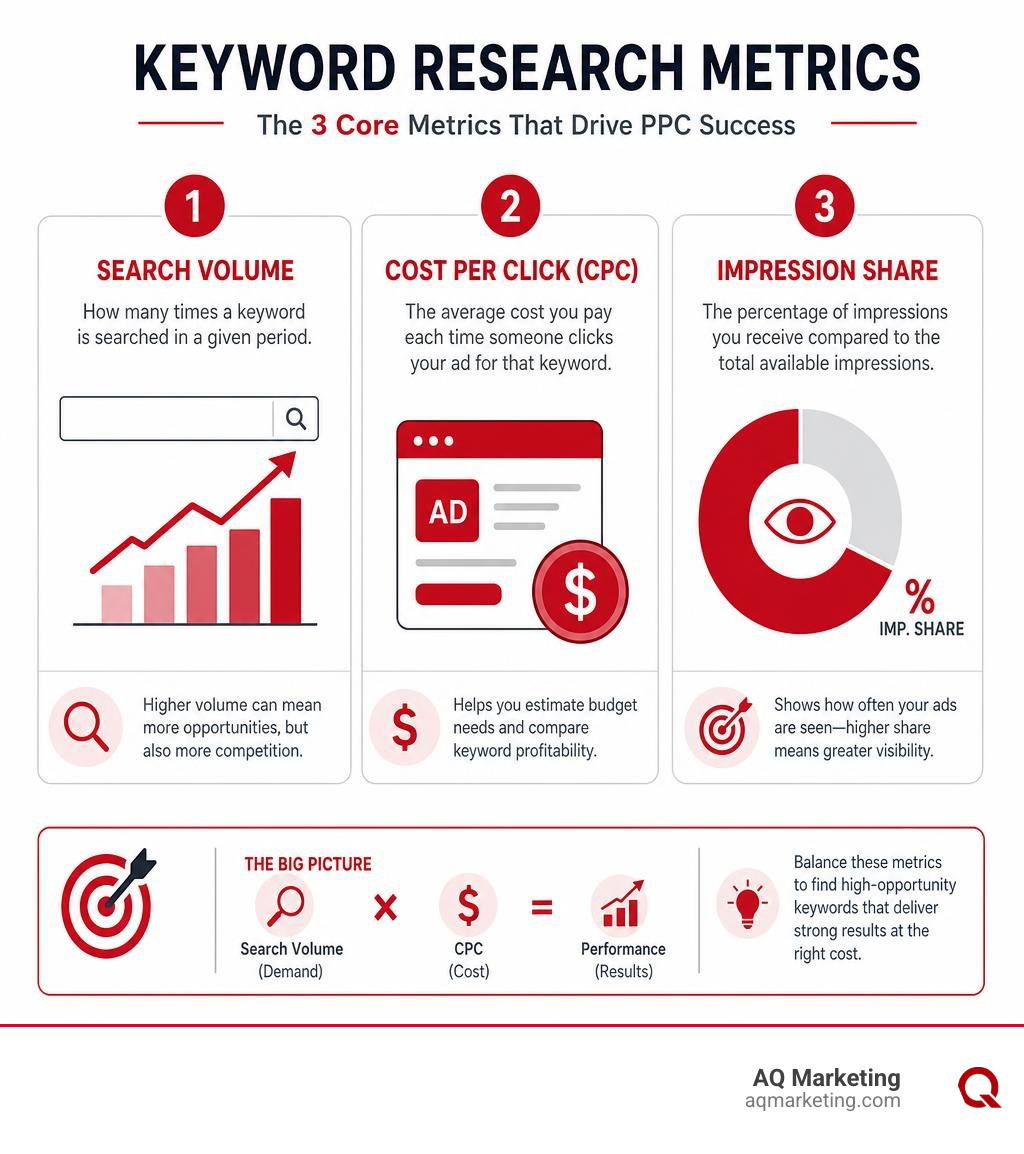
Understanding the mechanics of ad pricing helps you build predictable ad budgets:
For example, if your campaign receives two clicks—one costing $0.20 and another costing $0.40—your total cost is $0.60, making your Average CPC $0.30.
- Maximum CPC (Max CPC): The maximum cap you set manually for a single ad click.
- Actual CPC: The actual fee billed. Thanks to auction dynamics, you only pay one cent ($0.01) above the minimum amount required to hold your ad position, which is often lower than your Max CPC cap.
- Bidding Modes: You can manage bids using Manual CPC for total budget control, or switch to Enhanced CPC (ECPC), which automatically scales manual bids up or down based on conversion likelihood.
Setting Up, Managing, and Tracking Your Campaign for Peak Traffic

A successful campaign relies on careful setup. Before turning on live ad spend, read our quick checklist on 7 Things to Do Before You Launch a PPC Campaign. Structuring tight ad groups focused around single search themes keeps your ad text aligned with search intent. For a step-by-step walkthrough, check out our guide on PPC Campaigns 101: Stop Wasting Money and Start Getting Clicks.
Essential Metrics: Quality Score, CTR, and Conversion Rates
To maximize website traffic within a fixed budget, monitor these core performance metrics continuously:
- Click-Through Rate (CTR): The percentage of users who click your ad after seeing it. High CTR signals relevant ad copy and strong search alignment.
- Quality Score: A score from 1 to 10 assigned by Google based on expected CTR, ad relevance, and landing page user experience. A high Quality Score lowers your actual CPC and improves ad position.
- Conversion Rate: The percentage of ad clicks that result in desired user actions, like filled contact forms or phone calls.
Elevating Ad Relevance with Dynamic Pay Per Click Keyword Insertion
Dynamic Keyword Insertion (DKI) automatically updates your text ad to include the exact term that triggered the ad, increasing ad relevance instantly.
To set up dynamic keyword insertion safely, follow these rules:
- Use Proper Syntax: Insert
{KeyWord:Default Text}into your ad headline or description line. - Include Default Text: Always set clear default text (e.g., "Local Plumbing Services") to display if a search term exceeds character limits.
- Mind Character Limits: Headlines allow up to 30 characters; descriptions permit up to 90 characters.
- Capitalization Rules: Use
KeyWordfor Title Case,Keywordfor Sentence Case, orkeywordfor lowercase text.
For official step-by-step setup instructions, consult Google's documentation to Set up keyword insertion for your ad text.
Frequently Asked Questions About Pay-Per-Click Keywords
What is the average cost-per-click for small business ad campaigns?
Based on average online data, most small business search campaigns see cost-per-click rates ranging between $1.50 and $7.00 per click. However, overall industry pricing spans a wide range. Competitive industries like legal, specialized insurance, or emergency home repairs can see top-of-page bids reaching $25.00 to $50.00+ per click—more than 3× the average rate. This pricing reflects industry data and does not represent AQ Marketing's actual pricing.
How often should negative keywords be updated in a PPC campaign?
You should review your campaign's Search Term Report weekly during the first month of a new campaign. Identifying and adding non-relevant search queries to your negative keyword list on a regular schedule prevents budget waste early on. Once campaigns stabilize, bi-weekly or monthly negative keyword audits help maintain high lead quality.
What is the difference between broad match and exact match keywords?
Broad match offers the widest reach by displaying your ad on searches related to your keyword, including implicit concepts, variations, and related topics. Exact match offers strict control, showing your ad only when a user's search query shares the exact meaning and intent of your selected keyword phrase.
Conclusion
Mastering every pay per click keyword in your account is one of the fastest ways to eliminate wasted ad spend and generate reliable business growth. By selecting high-intent search terms, setting smart match types, maintaining negative keyword lists, and monitoring your Quality Score, you can turn search ad budgets into predictable revenues.
At AQ Marketing, we’ve spent over two decades helping businesses across Woburn and the greater Boston area build and manage high-converting digital ad campaigns. Explore our comprehensive pay-per-click advertising services or reach out to our team today to optimize your search marketing strategy!