

Google My Business Management: Top Strategies in 2024
Google My Business management is your key to growing online visibility through a free and powerful tool for businesses of all sizes. A Google Business Profile lets you turn local searches into real customers by appearing on Google Search and Maps with up-to-date information about your business. You can optimize your profile by adding photos, current operating hours, and special offers, ensuring potential customers find the most relevant and engaging details about your business.
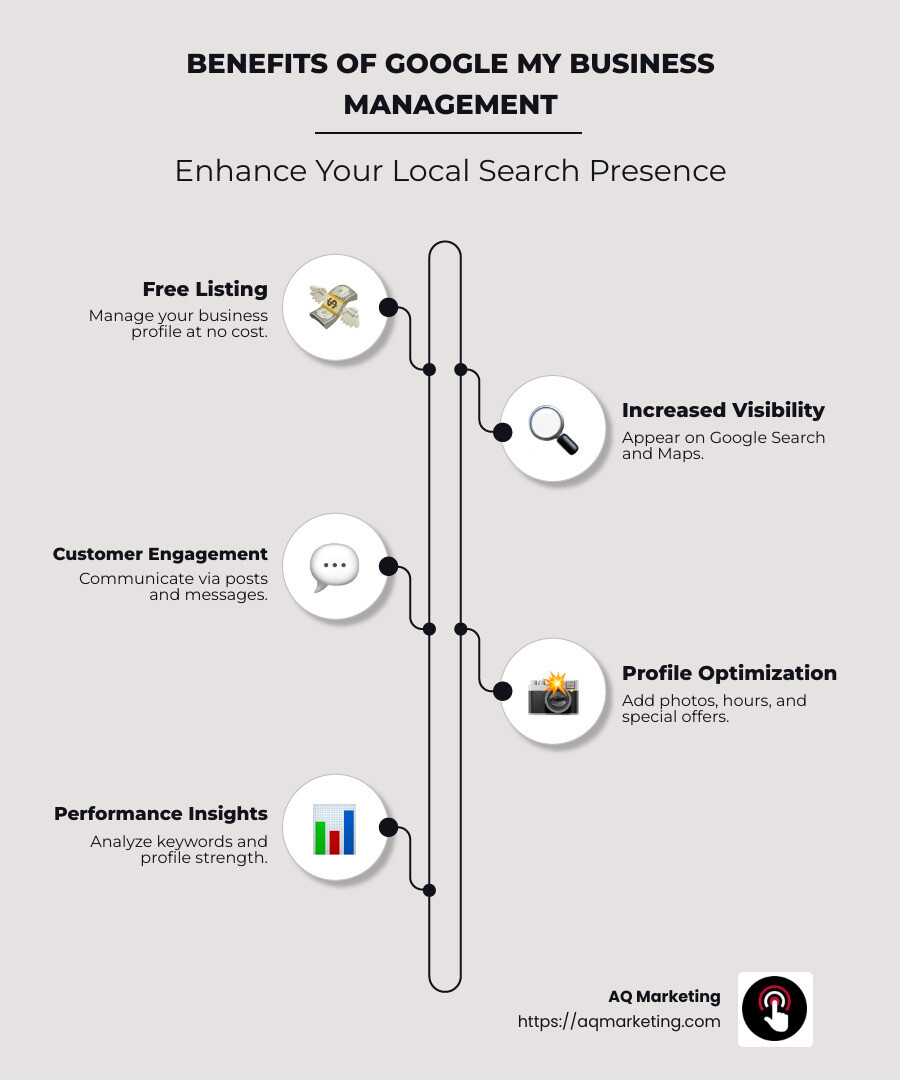
Understanding the core benefits of Google My Business management can dramatically improve your local search presence:
- Free listing: Create and manage your business profile at no cost.
- Local visibility: Show up in Google Search and Maps when customers look for services like yours.
- Customer interaction: Engage directly with customers through posts and messages.
With years of experience as the President and CEO of AQ Marketing, I’m Robert P. Dickey, here to guide you through the nuances of Google My Business management. My expertise lies in helping businesses improve their online presence, ensuring they stand out in a competitive market.
Handy Google My Business management terms:
– Business profile management
– Digital marketing for contractors
– Digital marketing for home services
Understanding Google My Business Management
Google My Business management is essential for any business aiming to improve its online presence. By effectively managing your Business Profile, you can ensure your business appears prominently on both Google Search and Google Maps. This visibility is crucial because many customers rely on these platforms to find local businesses.
What is a Business Profile?
A Business Profile is your business’s digital storefront on Google. It includes your business name, location, hours, contact information, and more. Having a complete and accurate profile ensures that potential customers get the right information when they search for your services.

Why Use Google Maps for Your Business?
Google Maps is not just for directions; it’s a powerful tool for customer engagement. When your business appears on Google Maps, customers can easily find you, read reviews, and even see photos of your establishment.
- Visibility: Your business can appear in local search results, increasing the chances that nearby customers will find you.
- Customer Trust: A well-maintained profile with positive reviews can build trust and encourage more foot traffic.
Key Features of Google My Business Management
Google My Business management offers several features to help you connect with customers:
- Posts and Updates: Share news, offers, and events directly on your profile to keep customers informed.
- Photos and Videos: Visual content can attract more attention and give customers a glimpse of what to expect.
- Review Response: Engage with your customers by responding to their reviews, showing that you value their feedback.
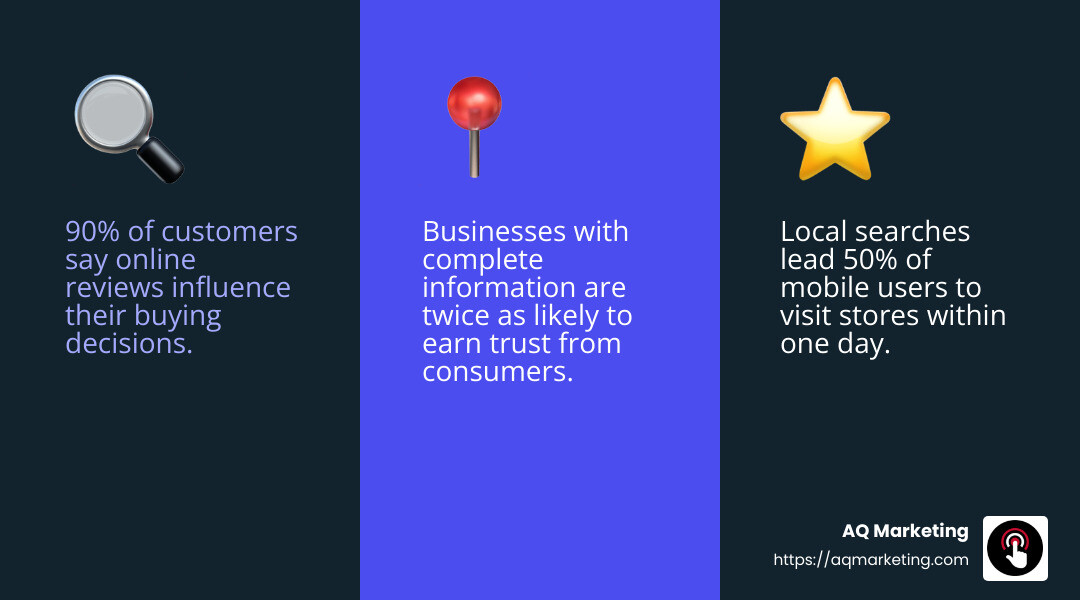
Having a well-managed Google My Business presence is not optional—it’s essential. By leveraging the features available, you can significantly improve your business’s online visibility and customer engagement.
Setting Up Your Google Business Profile
Creating a Google Business Profile is the first step to boosting your business’s online presence. It’s free, easy, and essential for reaching local customers.
Create Your Profile
- Sign Up: Go to the Google Business Profile website. Click “Manage Now” and sign in with your Google account.
- Enter Your Business Information: Fill in your business name, address, and phone number (NAP). Make sure this information is accurate and consistent with other online listings.
- Choose Your Business Category: Select the category that best represents your business. This helps Google show your profile to the right people.
- Verify Your Business: Google will send a postcard with a verification code to your business address. Enter this code to confirm your location and start managing your profile.
Personalize Your Profile
- Add Photos: Upload high-quality photos of your storefront, products, or services. Businesses with photos receive 42% more requests for directions and 35% more clicks to their websites.
- Set Your Hours: Clearly state your operating hours. Include any special holiday hours to keep customers informed.
- Write a Business Description: Describe what makes your business unique. Use simple, engaging language to attract potential customers.
Manage Your Profile
- Update Regularly: Keep your information current. Update your profile with new photos, special offers, and announcements.
- Engage with Customers: Respond to reviews and messages promptly. This shows you care about customer feedback and can improve your reputation.
- Use Insights: Google provides insights on how customers find your business. Use this data to adjust your strategy and attract more visitors.
Setting up and managing your Google Business Profile effectively can significantly improve your visibility on Google Search and Maps. By keeping your profile updated and engaging with customers, you position your business for success in the digital landscape.
Next, we’ll explore how to optimize your profile to make it even more appealing to potential customers.
Optimizing Your Google Business Profile
Once your Google Business Profile is set up, it’s time to make it shine. Optimizing your profile can attract more customers and improve your online presence.
Photos
Photos are crucial. They catch the eye and tell a story about your business. According to Google, businesses with photos receive 42% more requests for directions and 35% more clicks to their websites.
- Add High-Quality Photos: Include images of your storefront, products, and services. Make sure they are clear and professional.
- Update Regularly: Keep your photo gallery fresh. Add new pictures to show any changes or special events.
Posts
Posts are a great way to share updates and engage with customers. Think of them as mini-ads on your profile.
- Create Engaging Content: Share news, offers, or events. Keep it short and sweet.
- Use Call-to-Actions: Encourage customers to visit your website or contact you for more details.
Reviews
Reviews are powerful. They influence potential customers and build trust.
- Respond Promptly: Acknowledge both positive and negative reviews. Show appreciation and address concerns.
- Encourage Reviews: Ask happy customers to leave a review. More reviews can improve your profile’s visibility.
Updates
Keeping your profile updated is key to maintaining accuracy and relevance.
- Check Your Information: Regularly verify your business hours, address, and contact details.
- Highlight Special Offers: Update your profile with promotions or new products to attract attention.
Optimizing your Google Business Profile is an ongoing process. By focusing on photos, posts, reviews, and updates, you can improve your profile’s appeal and connect with more customers.
Next, we’ll dive into how to engage directly with customers through your profile.
Engaging with Customers
Engaging with customers is a crucial part of Google My Business management. It helps build relationships and keeps your audience interested. Let’s explore how you can use direct messaging, offers, and reservations to connect with your customers.
Direct Messaging
Direct messaging allows you to communicate with customers in real time. It’s like having a conversation over text, making it personal and immediate.
- Enable Messaging: Turn on messaging in your Google Business Profile settings. This lets customers reach out to you directly.
- Respond Quickly: Aim to reply within 24 hours. Quick responses show that you value customer inquiries.
- Be Professional and Friendly: Keep your tone friendly but professional. Answer questions, provide information, and resolve any issues.
Offers
Offers are a great way to attract new customers and keep existing ones coming back. They can include discounts, special promotions, or limited-time deals.
- Create Attractive Offers: Use eye-catching titles and clear descriptions. Highlight the benefits to grab attention.
- Update Regularly: Change offers based on seasons, holidays, or inventory. This keeps your profile dynamic and engaging.
- Use Call-to-Actions: Encourage customers to take advantage of offers by including phrases like “Limited time only” or “Visit us today”.
Reservations
For businesses like restaurants or salons, offering reservations can streamline customer interactions and improve service.
- Set Up Reservations: If applicable, enable the reservation feature. This lets customers book appointments or tables directly through your profile.
- Confirm and Remind: Send confirmation messages and reminders to reduce no-shows.
- Offer Flexibility: Allow customers to modify or cancel reservations easily, providing a better user experience.
By leveraging direct messaging, offers, and reservations, you can create a more interactive and customer-friendly profile. This not only improves customer satisfaction but also strengthens your business’s online presence.
Next, we’ll explore how to analyze your business performance using insights and data from your profile.
Analyzing Your Business Performance
Once you’ve set up and engaged with your Google Business Profile, it’s time to measure how well it’s doing. Analyzing your business performance is a key part of Google My Business management. Here’s how you can use keywords, insights, and profile strength to understand and improve your profile.
Keywords
Keywords are the phrases people use to find businesses like yours. They are crucial for appearing in relevant search results.
- Identify Popular Keywords: Use tools like Google Trends to find out which keywords are popular in your industry. This can help you understand what potential customers are searching for.
- Incorporate Keywords: Make sure these keywords appear naturally in your business description, posts, and even in responses to reviews. This boosts your visibility.
- Monitor Changes: Trends can change, so regularly update your keywords to stay relevant and attract more visitors.
Insights
Google provides valuable insights to help you understand how customers interact with your profile.
- View Customer Actions: Insights show how many people called you, visited your website, or requested directions. This helps you see what’s working.
- Check Search Queries: Find out what search terms people used to find your business. This can guide your content strategy.
- Assess Engagement: Look at how often people view your photos and posts. High engagement indicates strong interest in your business.
Profile Strength
The Profile Strength Indicator helps ensure your profile is complete and effective.
- Fill in Missing Information: Make sure your business description, hours, and contact info are up-to-date and complete. This boosts your profile’s strength.
- Consistent Updates: Regularly update your profile with new photos, posts, and offers. This keeps your profile fresh and engaging.
- Verify Your Business: Only verified businesses can access the Profile Strength Indicator. Verification adds credibility and trustworthiness to your profile.
By focusing on keywords, insights, and profile strength, you can optimize your Google Business Profile for better visibility and customer engagement. This data-driven approach helps you make informed decisions to improve your business’s online presence.
Next, let’s discuss how to transition from the Google My Business app to managing your profile on the Google Maps app.
Transitioning from Google My Business App
Transitioning from the Google My Business app to managing your profile on the Google Maps app is simpler than it may seem. This change allows you to keep your Google My Business management efficient and up-to-date.
Google Maps App
The Google My Business mobile app is no longer available, but don’t worry! You can now manage your Business Profile using the Google Maps app. This app is accessible on both Android and iOS devices.
- Download the App: If you haven’t already, download the Google Maps app from your device’s app store.
- Sign In: Use the same Google Account you used for your Google My Business profile to sign in.
- Access Your Profile: Tap on the Business icon at the bottom right corner of the app to access your profile.
Manage Your Profile
The Google Maps app offers a user-friendly interface to manage your Business Profile.
- Edit Profile: You can update your business information such as address, hours, and contact details directly through the app.
- Photos and Posts: Add new photos and create posts to keep your profile engaging. This helps attract more customers.
- Read and Respond to Reviews: Stay connected with your customers by reading and responding to their reviews. Positive interactions can boost your business’s reputation.
Updates
Keeping your profile updated is crucial for maintaining a strong online presence.
- Regular Updates: Make it a habit to regularly check and update your business information. This ensures that customers always have the latest details.
- Profile Strength: Use the Profile Strength Indicator to identify areas that need improvement. A strong profile can lead to better visibility in search results.
- Google Updates: Be aware that Google may update your profile based on user reports or licensed content. Regularly review these changes to ensure accuracy.
By managing your Business Profile on the Google Maps app, you can ensure your business information is always current and engaging. This transition is a step towards more efficient Google My Business management.
Next, we will address some frequently asked questions about Google My Business management to help you steer this essential tool.
Frequently Asked Questions about Google My Business Management
What is Google My Business Manager?
Google My Business Manager is a tool that allows you to manage your business presence across Google apps like Google Search and Google Maps. It’s designed to help you showcase your business information, engage with customers, and analyze your performance. By using this tool, you can ensure that your business details are accurate and up-to-date, making it easier for potential customers to find you.
Google My Business Manager also facilitates data sharing across various platforms, ensuring a consistent and professional online presence. This is crucial for businesses aiming to improve their local search visibility and customer engagement.
Is Google Business Manager free?
Yes, Google Business Manager is completely free. It allows you to create and manage your business listing without any cost. This free listing helps your business appear on Google Search and Google Maps, giving you a valuable opportunity to attract more local customers.
By using this free tool, you can manage your business information, post updates, and respond to customer reviews. This improves your online presence and can lead to increased traffic and sales.
How do I manage my Google Business Profile?
Managing your Google Business Profile is straightforward and can be done via both Google Search and the Google Maps app. Here’s how:
- Google Search: Simply search for your business on Google. Once your Business Profile appears, you’ll see options like Edit profile, Add photos, and Read reviews. These tools allow you to update your business information, add engaging content, and interact with customers.
- Google Maps App: In the app, tap on the Business icon at the bottom right to access your profile. From here, you can manage all aspects of your profile, from updating your hours to posting new photos.
Keeping your profile updated is key to maintaining a strong online presence. Regularly check and refresh your business details to ensure accuracy and relevance. This proactive approach to Google My Business management can help you stay ahead of the competition and attract more customers.
This FAQ section should help you steer the essentials of managing your Google Business Profile effectively. In the next section, we’ll conclude with some insights on how AQ Marketing can support your digital marketing efforts.
Conclusion
Maintaining a robust online presence is more crucial than ever for businesses of all sizes. At AQ Marketing, we specialize in helping small to medium-sized businesses improve their visibility and reach through effective digital marketing strategies. Our expertise spans across various services, from search engine optimization to social media management, ensuring that your business stands out in the crowded online marketplace.
Google My Business management is a key component of a successful online strategy. By optimizing your business profile, you can improve your local search visibility and engage directly with potential customers. This not only boosts your brand’s credibility but also drives more traffic to your storefront or website.
Our team at AQ Marketing understands the nuances of digital marketing and is dedicated to delivering long-term, impactful results. Whether you’re in the home services industry or the insurance sector, we tailor our strategies to meet your unique needs and goals.
If you’re looking to improve your online presence and attract more local customers, consider partnering with us. Let us help you steer the complexities of digital marketing and take your business to new heights.
For more information on how we can assist with your Google Business Profile management, visit our Business Profile Management page.
Together, let’s make your business shine online!
