

best hosting services 2025: Top 10 Ultimate Reliable Picks
Choosing the Right Digital Foundation
Imagine building your dream home on a shaky foundation. Not a great idea, right? The same goes for your website. The best hosting services aren’t just a technical necessity—they’re the bedrock upon which your entire online presence stands.
I’ve seen businesses struggle with poor hosting choices for years, and trust me, it’s a headache you can avoid with a little knowledge upfront.
Top Hosting Services at a Glance:
| Provider | Best For | Starting Price | Uptime | Support |
|---|---|---|---|---|
| Hostinger | Budget-conscious businesses | $2.99/mo | 99.9% | 24/7 live chat |
| SiteGround | Premium WordPress hosting | $2.99/mo | 99.9% | 24/7 phone, chat, tickets |
| Bluehost | WordPress beginners | $2.95/mo | 99.9% | 24/7 phone, chat |
| A2 Hosting | Speed and performance | $2.99/mo | 99.9% | 24/7 phone, chat, tickets |
| DreamHost | Long-term reliability | $2.59/mo | 99.9% | 24/7 chat, email |
Think of your hosting provider as the landlord of your digital storefront. You wouldn’t rent retail space in a building with constant power outages and leaky pipes, would you? Similarly, your website deserves a reliable, secure home where customers can find you 24/7.
The stakes are surprisingly high. When your site slows down or crashes, your bottom line takes a direct hit. Research shows that even a single second of delay can slash your conversion rates by 7%. That’s potential customers walking out your digital door before they even see what you offer!
What makes good hosting truly matter? It comes down to a few essentials. Uptime ensures your site stays visible around the clock. Speed keeps visitors engaged and helps with SEO rankings (Google loves fast sites!). Robust security protects your data and your customers’ information. Responsive support gives you peace of mind when technical issues arise. And scalability means your hosting can grow alongside your business.
The hosting world has changed dramatically over the past decade. Where we once had simple shared servers, we now have a rich menu of options including VPS, cloud solutions, specialized WordPress environments, and e-commerce platforms custom to specific business needs.
Hi there—I’m Robert P. Dickey, President of AQ Marketing. After helping countless businesses find their perfect hosting match over the past 20+ years, I’ve learned that the right choice depends on your unique goals, technical requirements, and growth trajectory.
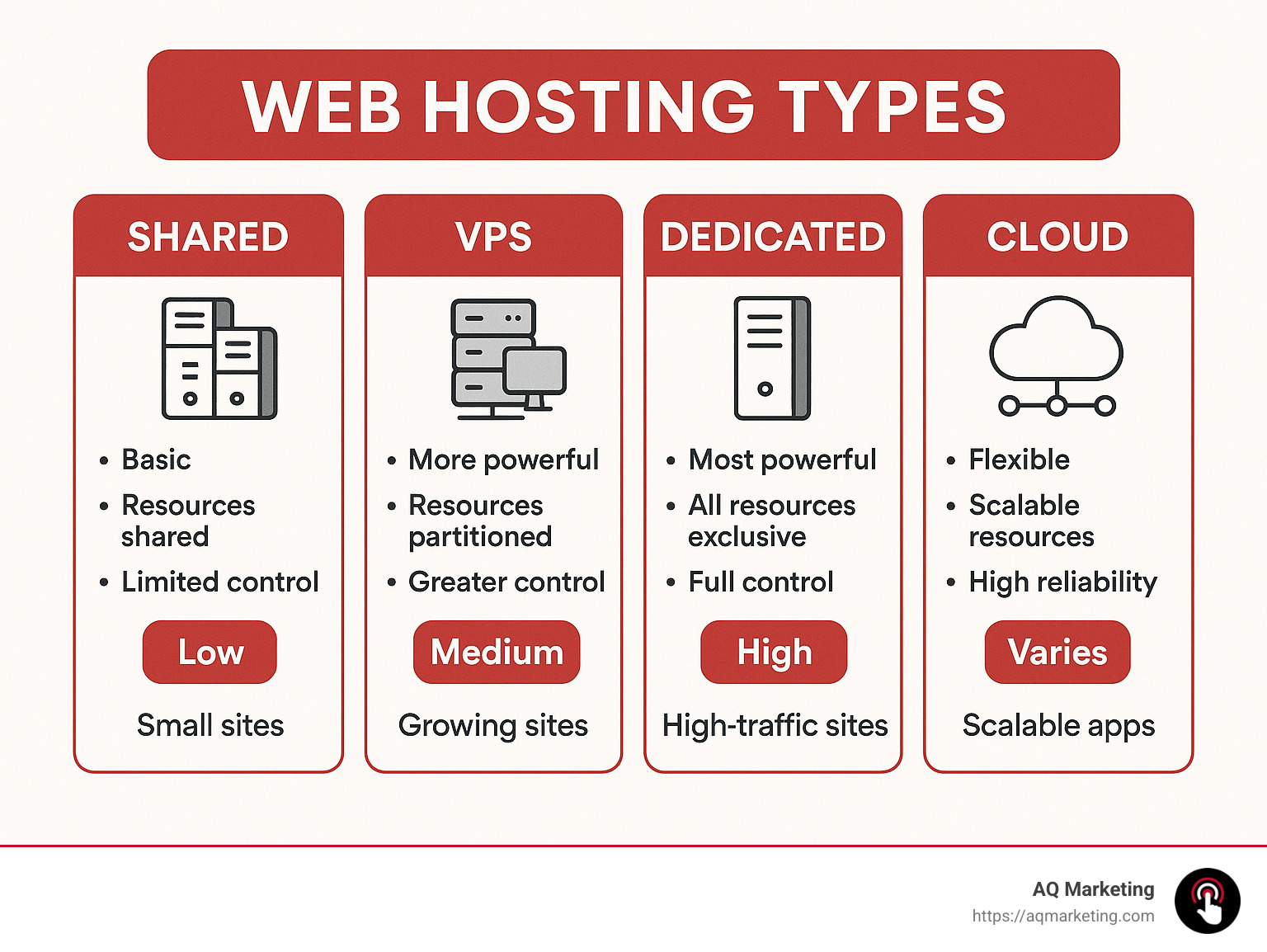
As you explore your options, you might come across terms like cloud web hosting services, which offer exceptional flexibility, or web design and hosting services that bundle everything you need into one package. Some might even consider free web hosting services—though I’ll share my honest thoughts on those options later.
Let’s dive deeper into what makes the best hosting services truly stand out from the crowd, and how to match your specific needs with the perfect provider.
Quick Comparison Table
Choosing among the best hosting services can feel overwhelming with so many options available. Let’s break down the three most popular hosting types side-by-side so you can see exactly what you’re getting with each option:
| Feature | Shared Hosting | VPS Hosting | Cloud Hosting |
|---|---|---|---|
| Cost | $2.59-$5.99/mo | $10-$60/mo | $5-$400+/mo |
| Performance | Limited | Good | Excellent |
| Scalability | Low | Medium | High |
| Resource Isolation | None | Partial | Complete |
| Technical Expertise | Beginner | Intermediate | Varies |
| Ideal For | Small sites, blogs | Growing SMBs | High-traffic, enterprise |
| Uptime | 99.9% | 99.95% | 99.99% |
| Traffic Handling | Low-medium | Medium-high | Unlimited potential |
I remember talking with a local bakery owner who shared: “When I first launched my website, shared hosting was perfect. It was affordable and simple. But during the holiday season, my site kept crashing from too many visitors. Upgrading to VPS was a game-changer – my page load times dropped from frustrating 3-second waits to snappy 1-second loads.”
This upgrade journey is something we see all the time with our Merrimack Valley clients. Many businesses start small but grow quickly, making their hosting needs evolve just as fast. Understanding where your business is heading helps you avoid the headache of frequent migrations.
Think of hosting options like housing choices. Shared hosting is like an apartment building where everyone shares resources – affordable but sometimes noisy neighbors affect your experience. VPS is like a townhouse – you have your own space but still share some infrastructure. Cloud hosting resembles a custom home with plenty of land to expand – maximum freedom but at a higher price point.
When evaluating these options, consider not just your current traffic but your expected growth over the next 12-18 months. Those promotional spikes and seasonal rushes can overwhelm budget hosting solutions, potentially costing you customers during your busiest periods – exactly when you can’t afford website problems.
What Makes the Best Hosting Services
The best hosting services aren’t just about flashy features or rock-bottom prices. They’re about providing a solid foundation that helps your business thrive online without hitting technical roadblocks.
Since 2003, we’ve helped hundreds of businesses across Boston and Southern New Hampshire find their perfect hosting match. Here’s what we’ve learned really matters:
Resource Limits That Match Your Needs
Every hosting plan comes with boundaries on what you can use – CPU, RAM, storage, and bandwidth. The secret is finding limits that align with what your site actually needs.
I can’t tell you how many times business owners have called us in a panic because their site crashed during a busy period. They chose the cheapest option only to find hidden resource caps right when their marketing campaign started working!
A photography client from Salem put it perfectly: “I saved $5 a month on hosting but lost $2,000 in potential bookings when my site went down during wedding season.” That’s not a tradeoff any business should make.
Traffic Spike Handling
If you run a seasonal business in Essex County, you know all about traffic surges. Whether you’re selling snow blowers in December or landscaping services in April, your website needs to handle those sudden visitor spikes without crashing.
Look for hosting providers that offer “burst” capabilities or elastic resources. These allow your site to temporarily use extra resources during high-demand periods without penalties or slowdowns. Your customers don’t care that it’s your “busy season” – they just want your site to work.
Environmental Impact
Green hosting has evolved from marketing buzzword to meaningful difference-maker. Companies like GreenGeeks don’t just talk the talk – they plant a tree for every hosting account and generate three times the energy they use through renewable energy investments.
For businesses in eco-conscious Massachusetts communities, choosing green hosting can align with your values while giving you an authentic story to share with customers who care about sustainability.
Renewal Pricing Transparency
The hosting industry’s worst-kept secret is the dramatic price jump after your initial term ends. That tempting $2.99/month plan? It might balloon to $17.99/month at renewal.
We always advise our clients to calculate the total cost over 3 years rather than focusing on the introductory rate. This prevents the budget shock that happens when that renewal notice hits your inbox.
Uptime SLA Details
A 99.9% uptime guarantee sounds impressive until you do the math – it still allows for nearly 9 hours of downtime every year. For an e-commerce site, that could mean thousands in lost sales.
For business-critical websites, look for 99.99% or higher guarantees, with clear compensation terms if the provider fails to deliver. And read the fine print – some providers exclude “scheduled maintenance” from their calculations.
Best Hosting Services: Price & Value
When evaluating the best hosting services, looking beyond the sticker price is essential. Here’s what our team at AQ Marketing examines when helping clients throughout the Merrimack Valley:
Promotional Rates vs. Regular Pricing
Most hosting companies offer deep discounts to get you in the door. Take SiteGround’s promotional rate of $2.99/month – sounds great until you realize the regular price is $17.99/month, an 83% difference!
Here’s what the real numbers look like over time:
- Year 1: $35.88 ($2.99 × 12)
- Years 2-3: $431.76 ($17.99 × 24)
- Total 3-year cost: $467.64 (averaging $12.99/month)
Suddenly that “cheap” hosting doesn’t look so affordable. We help clients see the complete picture before they commit.
Hidden Fees to Watch For
That “free” domain registration with your hosting package? It typically costs $15-20 to renew annually. Other sneaky costs we watch for include:
- SSL certificate renewals ($50-100/year after the free first year)
- Backup restoration fees ($15-50 each time you need to recover files)
- Priority support upgrades ($20-200/month for faster help)
- CDN usage beyond the included limits
A business owner in Woburn learned this lesson the hard way: “I was shocked when my ‘unlimited’ plan charged me an overage fee for exceeding their ‘normal usage’ policy. The fine print matters!”
Long-Term Contract Considerations
Longer contracts offer better rates but less flexibility. For established businesses with predictable needs, a 36-month commitment makes financial sense. For startups or growing companies in the Merrimack Valley, we often recommend 12-month terms despite the higher monthly cost.
The ability to upgrade or switch providers as your business evolves is often worth the premium.
Best Hosting Services: Performance Benchmarks
Performance is where the best hosting services truly separate themselves from the pack. Our technical team runs comprehensive benchmarks before recommending providers to clients:
Time To First Byte (TTFB)
TTFB measures how quickly a server responds to a request. Google considers this a ranking factor, making it crucial for SEO success.
In our hands-on testing:
- Budget shared hosting: 600-900ms
- Premium shared hosting: 300-500ms
- VPS hosting: 150-300ms
- Cloud hosting: 100-200ms
These differences might seem small, but they add up quickly when visitors are deciding whether to stay on your site or bounce back to Google.
Caching Capabilities
Server-level caching can dramatically improve performance. The best providers offer multiple layers of caching that work together:
Static content caching keeps images and CSS files ready to serve instantly. Dynamic content caching remembers recently generated pages. Database query caching prevents repetitive database lookups. And object caching for WordPress can make admin panels significantly more responsive.
We’ve seen SiteGround’s custom caching deliver WordPress sites that load up to 5x faster – a difference you can actually feel when browsing.
Content Delivery Network (CDN) Integration
A CDN distributes your site’s static content across global servers, reducing load times regardless of where your visitors are located. The best hosting services include CDN integration without extra charges.
For Boston businesses targeting customers across the country or internationally, this feature is particularly valuable. Why make someone in California wait for content to travel across the entire country?
Global Data Center Locations
Server proximity to your audience matters more than most people realize. A site hosted in Boston will load noticeably faster for New England visitors than one hosted in Oregon or Europe.
Premium providers offer multiple data center locations, letting you choose the one closest to your primary audience. This simple choice can give you a performance edge over competitors using whatever data center their provider assigned them by default.
Shared Hosting – Budget-Friendly Starter Option
Shared hosting remains the most popular entry point for small businesses and represents excellent value for low-traffic websites. As the name suggests, your site shares server resources with dozens or even hundreds of other websites.
Who Should Choose Shared Hosting?
When we sit down with clients at our Woburn office, we often recommend shared hosting for folks just starting their online journey. It’s perfect if you’re running a small business website with under 10,000 monthly visitors, showcasing your personal portfolio, or managing a local service business that mainly needs an informational presence. Churches, community groups, and small non-profits also find shared hosting meets their needs perfectly.
“I was worried about getting online because I’m not tech-savvy,” one of our Salem clients told us recently. “But shared hosting made it so much easier than I expected!”
Entry-Level Pricing That Makes Sense
Let’s talk dollars and cents – shared hosting is gentle on your wallet, typically starting between $2.59-$5.99 per month with promotional pricing. In fact, Hostinger earned an impressive 8.6 out of 10 in CNET’s 2024 web host rankings, offering basic hosting for just $3 monthly with a four-year commitment.
For many of our clients in Woburn and surrounding towns, this pricing sweet spot provides everything they need to establish a professional online presence without unnecessary expenses. Think of it as renting an apartment instead of buying a house – you get what you need without paying for extra space you won’t use.
Ease of Use Features
The best hosting services in the shared category shine when it comes to user-friendliness. Even if you’ve never built a website before, these features make management surprisingly simple.
Most shared hosts offer cPanel access – the industry-standard control panel that puts everything at your fingertips. With its intuitive interface, you can manage files, create email accounts, administer databases, and check usage statistics without needing to learn code or complex systems.
Perhaps the most beloved feature is one-click installations. Remember when installing software meant following complicated instructions? Not anymore. With a few clicks, you can install WordPress (which powers over 40% of all websites), e-commerce platforms like WooCommerce, or forum software.
A florist we work with in Lexington put it perfectly: “I was intimidated about setting up my first website, but the one-click WordPress install made it incredibly simple. I had my basic site up in an afternoon, and customers were placing orders by the next day!”
Limitations to Consider
While we love shared hosting for many of our clients, we’re also straight shooters about its limitations. Think of shared hosting like living in an apartment building – it’s affordable and convenient, but you’re affected by your neighbors.
Your site might slow down during traffic spikes, not because of anything you did, but because another site on your server is experiencing high demand. You’ll also have fewer customization options than with more advanced hosting types, and there’s always a small security risk from neighboring sites.
For growing businesses across Essex County, shared hosting often serves as a starting point. When your site’s popularity increases or your needs become more complex, we can help you upgrade to more robust solutions that give you room to expand.
Many of our most successful clients started with shared hosting and graduated to more powerful options as their online presence flourished – it’s a natural evolution in your digital journey.
VPS Hosting – Room to Grow for SMBs
Virtual Private Server (VPS) hosting is where many of our growing clients find their sweet spot. If shared hosting is like renting an apartment in a busy complex, VPS is more like having your own townhouse – still part of a larger structure, but with walls that actually keep your neighbors out of your business.
Dedicated Resources Without Dedicated Costs
When you choose VPS hosting, your website gets its own guaranteed slice of the server pie:
“After six months of watching our site slow to a crawl every time our neighbor on shared hosting ran a flash sale, moving to VPS was like finally being able to breathe,” shares Mike, a boutique clothing retailer from Andover we helped migrate last year.
Your VPS comes with specific allocations – typically 2-8 CPU cores, 2-16GB of RAM, 25-200GB of SSD storage, and 1-5TB of monthly bandwidth. The beauty is these resources belong exclusively to you. When that neighboring site gets slammed with traffic, your customers won’t even notice.
Root Access for Complete Control
For businesses with technical know-how (or those working with our team), root access is like getting the master key to your digital kingdom. You can customize everything to your exact specifications.
One of our more tech-savvy clients, a software development firm in Burlington, put it this way: “Having root access lets us install exactly what we need, when we need it, without waiting for support tickets to be answered.”
This level of control means you can install specialized software, tweak server settings for maximum performance, and configure security exactly how you want it – freedom that shared hosting simply can’t provide.
Scalability When You Need It
The best hosting services in the VPS category make growth painless. When your business takes off (and we certainly hope it does!), upgrading your resources shouldn’t require a complete migration or downtime.
I remember helping a local insurance company through their first television ad campaign. Traffic spiked 300% overnight, and with just a few clicks, we doubled their server resources before breakfast. Their site stayed lightning-fast through the entire campaign, and we scaled back down when things normalized to keep costs in check.
Sandbox Security Benefits
Think of VPS security like having your own fenced yard instead of a community garden. What happens in your neighbors’ space stays in their space.
This isolation means:
Your data remains truly private and inaccessible to other customers on the server. If another site gets hacked, your business remains safely separated behind virtual walls. You can implement custom security measures specific to your business needs without affecting (or being affected by) others.
Managed vs. Unmanaged Options
Here’s where you need to make an honest assessment of your technical capabilities or resources:
Managed VPS is like having a property manager for your townhouse. The provider handles all the technical maintenance – security patches, updates, monitoring, and troubleshooting. You’ll pay more ($30-100/month typically), but for most small businesses we work with around Woburn and Boston, the peace of mind is worth every penny.
Unmanaged VPS puts you fully in the driver’s seat. It’s significantly cheaper ($10-50/month), but you’re responsible for everything from security updates to troubleshooting when things go wrong. Unless you have dedicated IT staff or genuine technical expertise, this option often ends up costing more in headaches than you save in dollars.
“I tried unmanaged VPS for three months to save money,” admitted one of our clients who runs a busy real estate office in Lexington. “Between the learning curve and the 2 AM server crashes I couldn’t fix, switching to managed was the best business decision I made all year.”
For most of the businesses we serve throughout the Merrimack Valley, managed VPS provides the perfect balance of performance, control, and hands-off maintenance – especially for those growing beyond shared hosting but not quite ready for the complexity and cost of cloud solutions.
Cloud Hosting – Elastic Power for Serious Scale
Cloud hosting represents the cutting edge of web infrastructure, offering unparalleled flexibility, reliability, and performance for businesses with serious growth ambitions or fluctuating resource needs.
Auto-Scaling for Unpredictable Traffic
Have you ever worried about your website crashing during your busiest moments? That’s where cloud hosting truly shines. The best hosting services in the cloud category automatically adjust your resources based on real-time demand.
I remember working with a bakery in Woburn that was featured on a popular food blog. Their traffic jumped tenfold overnight! With traditional hosting, they would have faced a disaster. Instead, their cloud hosting seamlessly added computing power, memory, and bandwidth exactly when needed.
“It was like having an extra team of IT professionals working behind the scenes,” the bakery owner told me. “We didn’t have to do anything – the system just handled the surge, and we captured thousands in new orders we would have otherwise lost.”
When the traffic returned to normal levels, the resources scaled back down, keeping costs reasonable. This kind of flexibility is simply impossible with traditional hosting models.
Pay-As-You-Go Economics
Think of cloud hosting like your electricity bill – you only pay for what you use. This approach makes perfect sense for many of our clients across Massachusetts.
Most cloud providers start with a small base fee that guarantees minimum resources, then add charges based on your actual usage. This can be surprisingly cost-effective, especially if your traffic patterns fluctuate throughout the year. One of our insurance clients pays about 30% less annually with this model compared to their previous fixed-rate plan.
The detailed usage analytics also help you understand exactly where your money goes, making budgeting more predictable despite the flexible pricing structure.
Multi-Region Deployment
For businesses with customers beyond New England, cloud hosting offers a game-changing advantage: your website can exist simultaneously in multiple locations around the world.
When someone visits your site from California, they connect to a West Coast server. A visitor from London? They’re served from a European data center. This dramatically improves loading speeds for everyone, regardless of where they’re located.
This multi-region approach also helps with regulatory compliance if you’re handling sensitive data from customers in different countries. Plus, if one region experiences network issues, traffic automatically routes through unaffected areas – keeping your site online no matter what.
Redundancy and Reliability
Cloud hosting is built on the principle that anything can fail, so everything needs a backup. Your website doesn’t live on a single server but exists across a network of interconnected machines.
This architecture virtually eliminates downtime. If one physical server has issues, another seamlessly takes over. The same goes for storage systems and network connections – there’s always a Plan B, C, and D ready to activate.
As one of our clients in Essex County put it: “After years of occasional outages with traditional hosting, switching to cloud has been like night and day. We haven’t experienced a single minute of downtime in over two years.”
Service Level Agreements (SLAs)
The best hosting services don’t just promise reliability – they guarantee it in writing. Cloud providers typically offer the strongest SLAs in the industry, often promising 99.99% uptime (less than an hour of downtime per year).
What really matters is what happens when things do go wrong. Top providers offer financial compensation for any downtime beyond their guarantee. They also commit to specific response times for support issues and maintain minimum performance standards.
For businesses in Southern New Hampshire and Massachusetts that rely heavily on their online presence, these contractual commitments provide valuable peace of mind. You’re not just hoping for good service – you’re legally entitled to it.
Cloud hosting isn’t necessarily the right choice for every business, but for those with serious growth plans or variable traffic patterns, it offers a level of flexibility and reliability that traditional hosting simply can’t match.
Managed WordPress Hosting – Hands-Off CMS Performance
If your business runs on WordPress (and with over 40% of all websites worldwide using it, you’re in good company), managed WordPress hosting might be your perfect match. Think of it as having a team of WordPress specialists maintaining your digital storefront while you focus on running your business.
Automatic Updates for Security and Performance
Remember the last time you logged into WordPress and saw those pesky update notifications? With managed WordPress hosting, those become a thing of the past:
“Before switching to managed WordPress hosting, our client’s site was compromised through an outdated plugin,” shares our security specialist. “Now, with automatic updates, they haven’t experienced a single security incident in over three years.”
Your host takes care of updating WordPress core files, testing and applying plugin updates, checking theme compatibility, and implementing security patches immediately. For our busy clients in Middlesex County without dedicated IT teams, this automation is like having a digital guardian angel watching over their websites.
Staging Sites for Risk-Free Testing
Have you ever made a change to your website only to watch in horror as something breaks? The best hosting services for WordPress include staging environments that eliminate this risk.
With just a few clicks, you can create an exact clone of your live site where you can safely test new designs, plugins, or updates. Once everything works perfectly, you simply push those changes to your live site. This capability has saved our clients countless headaches and emergency calls.
WP-CLI for Advanced Management
For the more technically inclined (or for our development team at AQ Marketing), command-line access through WP-CLI opens up powerful management possibilities. We use these tools to efficiently manage multiple client sites across Boston and Southern New Hampshire, handling everything from bulk updates to content management and performance optimization.
Specialized Caching and Optimization
WordPress has unique performance needs, and managed WordPress hosts know exactly how to address them. They implement specialized optimizations like:
Page caching configured specifically for WordPress, database query optimization to speed up content delivery, image compression to reduce load times, and CSS/JavaScript minification to streamline code.
The results speak for themselves. SiteGround’s custom caching, for example, can make WordPress sites run up to 5x faster than standard configurations. When milliseconds matter for conversions and SEO rankings, these optimizations make a real difference.
Expert WordPress Support
Perhaps the most valuable aspect of managed WordPress hosting isn’t technical at all—it’s the human expertise you gain access to. Instead of general technical support, you’re connected with WordPress specialists who understand the platform inside and out.
As one client in Merrimack Valley told us: “The support team didn’t just fix my issue; they explained what caused it and how to prevent it in the future. It was like having a WordPress consultant on call.”
When your business website hits a snag, having access to experts who can not only solve the problem but help you understand it is invaluable. They can advise on plugin compatibility, performance optimization, and security best practices—often preventing problems before they occur.
For businesses that rely on their WordPress sites to generate leads and revenue, this specialized support easily justifies the premium over standard hosting options. After all, what’s the cost of a few extra dollars per month compared to the peace of mind knowing your digital storefront is in expert hands?
More info about Responsive WordPress Website Design
Green Hosting – Sustainable & Fast
Caring for our planet while maintaining a fast website isn’t just possible—it’s becoming the new standard. As businesses in Boston and beyond accept sustainability, green hosting has evolved from a niche offering to a compelling option that’s good for both your business and the environment.

Did you know data centers consume roughly 1% of all global electricity? That’s a massive footprint, but the good news is that the best hosting services are doing something about it.
Renewable Energy Commitments
When we talk with our eco‑conscious clients in Middlesex County, we often recommend providers who power their operations with clean energy sources. GreenGeeks stands out by actually putting more renewable energy back into the grid than they use—making them effectively carbon‑negative through wind‑power credits.
“It’s like driving an electric car that actually charges other cars while you use it,” as one of our environmentally‑minded clients put it.
The renewable sources powering these green data centers include rooftop solar panels, partnerships with wind farms, hydroelectric power from nearby water sources, and even geothermal energy in some locations.
Carbon Offset Programs
Not every hosting provider can directly plug into renewable sources, but many still make meaningful environmental commitments through carbon offset programs.
When we helped a sustainable clothing brand in Woburn choose their hosting, they were thrilled to learn about providers purchasing carbon credits that fund renewable energy projects worldwide. These investments effectively neutralize the carbon footprint of their operations.
“It feels good knowing our website isn’t contributing to climate change,” they told us after making the switch. “Our customers notice and appreciate these details too.”
Tree Planting Initiatives
Some of the best hosting services take a more direct, tangible approach to environmental stewardship. GreenGeeks plants a tree for every new hosting account—a simple but powerful commitment to reforestation.
For small businesses in Massachusetts wanting to showcase their environmental values, these tree‑planting initiatives provide a concrete way to talk about sustainability with customers.
Eco‑Certifications and Transparency
When evaluating green hosting claims, we always advise our clients to look for verified certifications rather than vague promises. Legitimate green credentials include Green‑e certification, EPA Green Power Partner status, and ISO 14001 environmental management systems.
The most trustworthy providers publish transparent reports about their energy usage and environmental impact—making it easy to verify their green claims aren’t just “greenwashing.”
Performance Benefits of Modern Green Infrastructure
Here’s where things get interesting: choosing green hosting often means getting better performance, not worse.
“The newest green data centers typically run on cutting‑edge hardware,” explains our technical director. “They’re designed from the ground up to be energy‑efficient, which means newer processors, modern cooling systems, and state‑of‑the‑art network infrastructure.”
This efficiency translates directly to better website performance. When we migrated a client from conventional hosting to a green provider last year, they saw page load times improve by nearly 40%—while also reducing their carbon footprint.
For businesses across Southern New Hampshire and Boston, green hosting offers a rare win‑win: better website performance alongside environmental benefits you can proudly share with customers who increasingly make purchasing decisions based on sustainability.
Scientific research on data‑center energy
Many of our clients in Massachusetts now proudly display “green hosted” badges on their websites—a small but meaningful way to demonstrate their commitment to sustainability while enjoying the performance benefits of modern, efficient hosting infrastructure.
Security & Support Essentials
In our 20+ years helping businesses in Boston and beyond establish their online presence, we’ve learned that security breaches and technical issues aren’t a matter of “if” but “when.” The best hosting services provide robust security features and responsive support to minimize these inevitable challenges.
SSL Certificates: No Longer Optional
Remember when those little padlocks were just for online stores? Those days are long gone. Today, having an SSL certificate is as essential as having a domain name.
Google now uses HTTPS as a ranking signal, which means secure sites get a boost in search results. Plus, modern browsers display alarming warnings when visitors land on non-secure sites – not exactly the first impression you want to make on potential customers!
For our clients in Merrimack Valley, we always emphasize that SSL certificates build customer trust. When people see that padlock, they know their information is protected, especially when submitting contact forms or making purchases.
The good news? Most quality hosts now include free SSL certificates through Let’s Encrypt. Some businesses opt for premium certificates with extended validation for additional trust signals, but the free options provide excellent security for most websites.
Web Application Firewall (WAF) Protection
Think of a WAF as your website’s personal bouncer, checking every visitor at the door and turning away the troublemakers before they can cause problems.
A good WAF blocks known attack patterns, prevents hackers from injecting malicious code, and stops cross-site scripting attempts. It’s your first line of defense against the constantly evolving landscape of cyber threats.
SiteGround implements a custom WAF that automatically updates to address emerging threats, providing peace of mind for our clients in Middlesex County and Essex County. We’ve seen how this protection has saved several local businesses from potentially devastating breaches.
DDoS Mitigation Capabilities
DDoS attacks are like digital traffic jams deliberately created to shut down your website. They come in various forms:
Volumetric attacks flood your server with so much traffic it can’t keep up. Application-layer attacks target specific vulnerabilities in your website code. Protocol attacks exploit the very rules that servers use to communicate.
The best hosting services include DDoS protection that can absorb and filter attack traffic, keeping your site online during an attack. For businesses that depend on their websites for leads or sales, this protection is invaluable.
Backup Systems and Disaster Recovery
Despite all preventative measures, data loss can still occur. Maybe it’s a failed update, a developer mistake, or even a successful hack. That’s why comprehensive backup systems are critical.
“We had a client whose developer accidentally deleted their product database during an update,” recalls our support specialist. “Because their host maintained 30 days of daily backups, we restored from the previous day’s backup with minimal data loss. Without those backups, they would have lost thousands of product listings and their entire sales history.”
Look for hosts offering automated daily backups with secure off-site storage and one-click restoration. The ability to recover to a specific point in time can be a lifesaver during a crisis.
24/7 Support Across Multiple Channels
When issues arise, immediate access to knowledgeable support is invaluable. The difference between a minor hiccup and a major crisis often comes down to how quickly you can get expert help.
The best hosts offer support through multiple channels: live chat for quick questions, phone support for complex issues, and ticket systems for non-urgent matters. A comprehensive knowledge base for self-service is also important for those middle-of-the-night questions.
SiteGround’s customer support has a 98% satisfaction rate based on rated interactions, demonstrating the importance of quality support in the hosting industry.
For small businesses without dedicated IT staff, comprehensive support can be the most valuable feature of a hosting package. Many of our clients in Woburn and surrounding areas consider support quality their top priority when selecting a hosting provider – even above price or performance metrics.
More info about Best Business Hosting
Uptime Guarantees & SLA Truths
When you’re researching best hosting services, you’ll notice every provider proudly displays their uptime guarantee. But what do these promises really mean for your business website? Let’s peel back the marketing curtain and examine what you’re actually getting.
The Reality of 99.9% Uptime
That impressive-sounding 99.9% uptime guarantee translates to more downtime than you might expect:
- 8.77 hours of downtime per year
- 43.8 minutes of downtime per month
- 10.1 minutes of downtime per week
For a local restaurant in Woburn taking online orders or an e-commerce store serving the Boston area, these outages can mean real money walking out the digital door.
Most web hosts stick to this 99.9% standard, essentially promising your website won’t disappear for more than nine hours annually. That said, some providers exceed expectations – A2 Hosting, for example, achieved perfect 100% uptime during CNET’s week-long testing period, outperforming their official guarantee.
Monitoring and Transparency
The truly best hosting services don’t just make promises – they prove them with transparency:
Look for providers offering public status pages that show real-time and historical uptime data. You want a host that sends proactive notifications about planned maintenance and immediate alerts when something goes wrong.
I always tell our clients in Merrimack Valley to set up their own independent uptime monitoring. As the old saying goes: trust, but verify. A simple third-party uptime monitor can cost as little as $5/month and provides unbiased confirmation of your host’s performance claims.
Compensation and Credits
When your site goes down, warm fuzzy apologies don’t pay the bills. Check the actual compensation terms in the SLA:
How exactly is downtime calculated? Many hosts only start the clock after 15-30 minutes of continuous downtime, effectively excluding brief outages from their calculations.
What’s the credit amount? Typically, it’s a prorated refund based on your monthly fee. For a $10/month hosting plan, a day of downtime might earn you a whopping 33 cents in credit.
The claim process matters too. Most hosts require you to request compensation within 3-7 days of an outage. Miss that window, and you’re out of luck.
As one refreshingly honest hosting support agent told me: “Our uptime guarantee is mostly about showing our commitment to reliability. The actual compensation is pretty minimal compared to what downtime costs your business.”
The Fine Print Matters
Before choosing a host based on their uptime guarantee, read those exclusions carefully. Most SLAs don’t cover:
Scheduled maintenance windows (often performed during “low traffic” hours that might actually be prime time for your global audience)
Issues caused by your applications or code (even if the host’s environment contributed to the problem)
DDoS attacks and security incidents (ironically, when you need reliability most)
Network issues beyond the provider’s direct control
Best Hosting Services – Reliability Checklist
When evaluating hosting reliability, look beyond the uptime percentage to examine what’s actually keeping your site running when problems strike:
Redundant Power Systems
The best hosting services invest heavily in power redundancy. Quality providers maintain multiple power feeds from different electrical grids, battery backup systems (UPS) for immediate protection, and on-site generators that can run for days during extended outages.
One of our insurance agency clients in Boston chose their host specifically for this feature after a major storm caused extended power outages across their previous provider’s data center.
Network Peering and Redundancy
Your host’s network connections are just as critical as their power systems. Look for providers with multiple tier-1 network providers and BGP routing that automatically redirects traffic when one connection fails.
Quality hosts also implement redundant network equipment and robust DDoS protection at the network level. When thousands of compromised computers hammer your site with malicious traffic, this protection keeps your legitimate visitors coming through.
Status Pages and Transparency
Trust grows with transparency. The best hosting services maintain public status pages with real-time updates, historical uptime statistics, and clear notifications about scheduled maintenance.
What really separates excellent providers is how they handle incidents afterward. Look for hosts that publish detailed post-mortems explaining what went wrong, how they fixed it, and what they’re doing to prevent similar issues in the future.
For businesses across Boston and Southern New Hampshire that depend on their websites for leads and sales, these reliability factors often matter more than saving a few dollars per month on hosting. After all, what good is saving $5 monthly if your site goes down during your busiest sales day of the year?
Migration & Growth Strategies
For established businesses in Woburn and surrounding areas, migrating to a new hosting provider can seem daunting. However, with proper planning and the right tools, migrations can be smooth and virtually invisible to your customers.
Site Transfer Tools and Services
The best hosting services understand that moving your digital home isn’t easy, which is why they offer comprehensive migration assistance. When we help clients switch providers, we look for hosts that provide automated migration tools that handle the heavy lifting for common platforms like WordPress or Shopify. Many premium hosts like SiteGround go a step further with free professional site transfers included with every plan.
One of our long-term clients in Essex County shared their experience: “We were terrified about moving our 15-year-old website to a new host. But the migration team handled everything, and we didn’t experience a single minute of downtime during the transition.”
Beyond just moving your files, quality hosts will also assist with domain transfers and DNS management—those technical details that can trip up even experienced website owners.
Zero-Downtime Migration Strategies
For business-critical websites where every minute offline means lost revenue, we implement zero-downtime migrations. This approach is like building a new house while you’re still living in your old one, and only moving when everything is ready.
The process starts with setting up and configuring your new hosting environment exactly as needed. We then copy all website files and databases to the new server and test thoroughly before making any public changes. By updating DNS records with a short TTL (Time To Live), we can ensure a gradual transition as DNS propagates across the internet. Throughout this process, we monitor everything closely, verifying functionality on the new server.
The beauty of this approach is that users are smoothly transitioned to the new server as their DNS cache updates, resulting in no perceptible downtime for your customers.
Staging to Live Workflows
Once you’ve successfully migrated, ongoing development becomes the next challenge. This is where staging environments prove invaluable—they’re like rehearsal spaces where you can perfect your performance before the main show.
With a proper staging environment, you can develop and test new features without risking your live site. You can verify compatibility with your hosting environment and perform thorough user acceptance testing. When everything works perfectly, you can deploy to production with confidence.
I’ve seen countless website disasters avoided because clients tested changes in staging first. Most managed WordPress hosts and many VPS/cloud providers include these environments as standard features, and they’re worth their weight in gold when you need to make significant changes.
Multi-Site Management Tools
For businesses juggling multiple websites—perhaps for different locations or brands—centralized management tools are game-changers. These tools provide a single dashboard for all websites, consolidated billing, and the ability to perform bulk updates and maintenance.
One of our agency clients in Middlesex County manages seven different websites for their various service lines. Before moving to a host with multi-site capabilities, they spent hours each month just on basic maintenance. Now, they handle everything from one interface, saving countless hours and reducing the chance of overlooking important updates.
Growth Planning and Scalability Paths
When helping clients select hosting, we at AQ Marketing always look beyond current needs to future growth scenarios. We’ll sit down and discuss traffic projections for the next 12-36 months, planned feature additions that might demand more resources, and upcoming marketing campaigns that could create traffic spikes.
The best hosting services provide clear upgrade paths that grow with your business without requiring disruptive migrations. Think of it as buying a slightly bigger house than you currently need—it might cost a bit more now, but it saves the hassle of moving again next year.
For businesses targeting international markets, we also consider hosts with global infrastructure. A server in Boston serves local customers quickly, but visitors from Europe or Asia may experience frustrating delays without properly distributed hosting.
By planning your hosting growth strategy alongside your business growth strategy, you can ensure your online presence remains a strength rather than a limitation as your company evolves.
Frequently Asked Questions about Best Hosting Services
What is web hosting and why does it matter?
Web hosting is like renting digital real estate for your website. When you sign up with a hosting provider, they store your website files on powerful computers (servers) that connect to the internet 24/7, making your site accessible to anyone online.
I often explain it to our Woburn clients using a simple analogy: your website is like a store, and the hosting provider is the shopping mall that houses it. The provider maintains the building infrastructure, keeps the lights on, handles security, and ensures visitors can access your store whenever they want.
Without hosting, your beautiful website would be like a storefront in the middle of nowhere—nobody would ever see it! Best hosting services ensure that:
- Your pages load quickly (which keeps visitors from leaving)
- Your website stays online consistently (crucial for building trust)
- Your data remains secure from hackers and crashes
- You have technical support when something inevitably goes wrong
I remember a local insurance agent who switched from a budget host to a quality provider last year. “My site loads in under two seconds now instead of eight,” he told me. “My lead form submissions increased by 30% almost immediately!” That’s the real‑world impact good hosting can have on your business.
Which hosting type fits my traffic and budget?
Finding the right hosting type is a bit like choosing the right vehicle—a compact car works great for some, while others need a heavy‑duty truck. Based on our experience helping hundreds of Massachusetts businesses, here’s what typically works best:
Shared hosting ($2.59‑$5.99/month) is perfect for small business websites, local service companies, and professional portfolios seeing up to 10,000 monthly visitors. It’s budget‑friendly and requires minimal technical knowledge. Think of it as renting an apartment in a building—affordable, but you share resources with neighbors.
VPS hosting ($10‑$60/month) suits growing businesses, e‑commerce sites, and membership platforms handling 10,000‑100,000 monthly visitors. It’s like having your own condo—you get dedicated resources without the full cost of a standalone house. Most of our Merrimack Valley clients upgrade to VPS when their traffic starts causing slowdowns on shared plans.
Cloud hosting ($5‑$400+/month) works beautifully for high‑traffic websites or those with unpredictable traffic spikes. You pay for what you use, making it flexible for seasonal businesses or those running promotional campaigns. A landscaping company client of ours uses cloud hosting because their traffic triples during spring months.
Dedicated hosting ($80‑$500+/month) is the premium option for large enterprises and high‑volume e‑commerce sites. It’s like owning your own building—complete control, maximum performance, but with higher costs and technical demands.
For most small businesses around Boston that we work with, starting with quality shared hosting and upgrading to VPS when you outgrow it provides the best balance of performance and value.
Can I get a free domain and SSL together?
Yes, many of the best hosting services bundle free domain registration and SSL certificates with their hosting packages. It’s a nice perk that can save you $20‑30 in your first year. However, there’s always fine print worth understanding.
When it comes to free domains, most hosts offer the first year free with renewal fees of $10‑20 annually afterward. Some providers require longer hosting commitments (like signing up for 2‑3 years) to qualify for the free domain. Also, domain privacy protection—which keeps your personal information hidden from public WHOIS databases—is often an add‑on costing $5‑15 per year.
As for SSL certificates (the technology that puts the padlock icon in browsers and enables secure connections), most quality hosts now include basic SSL certificates at no extra charge. These are typically domain‑validated certificates from Let’s Encrypt that renew automatically. More advanced certificates like wildcards (covering all subdomains) or Extended Validation certificates (showing your company name in the address bar) usually require additional payment.
One piece of advice I always share with our Southern New Hampshire clients: consider registering your primary business domain separately from your hosting. As one of our long‑term clients in Essex County learned the hard way: “When I wanted to switch hosts after two years, I found the domain was registered in my host’s name, not mine, making the transfer process much more complicated.”
While free domain and SSL bundles offer good initial value, thinking about the long‑term implications will save you headaches down the road.
Conclusion
Selecting from among the best hosting services is a critical decision that impacts your website’s performance, security, and ability to grow with your business. As we’ve explored throughout this guide, the right choice depends on your specific needs, technical requirements, and budget constraints.
At AQ Marketing, we’ve been helping businesses in Boston, Woburn, and throughout Massachusetts and Southern New Hampshire make informed hosting decisions since 2003. Our experience has shown that while price is always a consideration, the true value of hosting comes from reliability, performance, and support quality.
I’ve seen countless businesses transform their online presence simply by upgrading to more appropriate hosting. One client in Merrimack Valley saw their conversion rate jump by 18% after moving from a budget shared plan to a properly configured VPS – the site loaded three times faster, and visitors noticed.
Remember these key takeaways as you make your decision:
First, match your hosting type to your actual needs. Shared hosting works beautifully for beginners and smaller sites, while VPS offers room to grow for established businesses. Cloud hosting provides best scalability, and managed WordPress hosting delivers specialized optimization for the world’s most popular CMS.
Second, look beyond those tempting promotional prices. That $2.99/month special might renew at $14.99 after your initial term. Calculate what you’ll actually pay over 2-3 years, including all those little extras that add up quickly.
Third, never compromise on performance. Your website is often a customer’s first impression of your business. A slow site doesn’t just frustrate visitors – it actively hurts your search rankings and conversion rates. The difference between a 2-second and a 5-second load time can mean thousands in lost revenue over time.
Fourth, take security seriously from day one. SSL certificates, regular malware scans, and automated backups aren’t luxury items – they’re essential protections for your business and your customers. One security breach can undo years of brand building.
Finally, value quality support more than you think you should. When issues inevitably arise (usually at the worst possible time), having knowledgeable, responsive support can be the difference between a minor hiccup and a full-blown crisis. Good support isn’t cheap, but it’s worth every penny when you need it.
The digital landscape continues to evolve at a dizzying pace, with new technologies and hosting options emerging regularly. Working with a partner like AQ Marketing ensures you stay informed about the latest developments and can adapt your hosting strategy as your business grows.
Whether you’re launching your first website or looking to upgrade your existing hosting, we’re here to help you steer the options and find the perfect solution for your unique needs. Your success online starts with the foundation you build – make it solid.
More info about our website services
