

Improve Local Search Rankings: 11 Essential Tips 2025
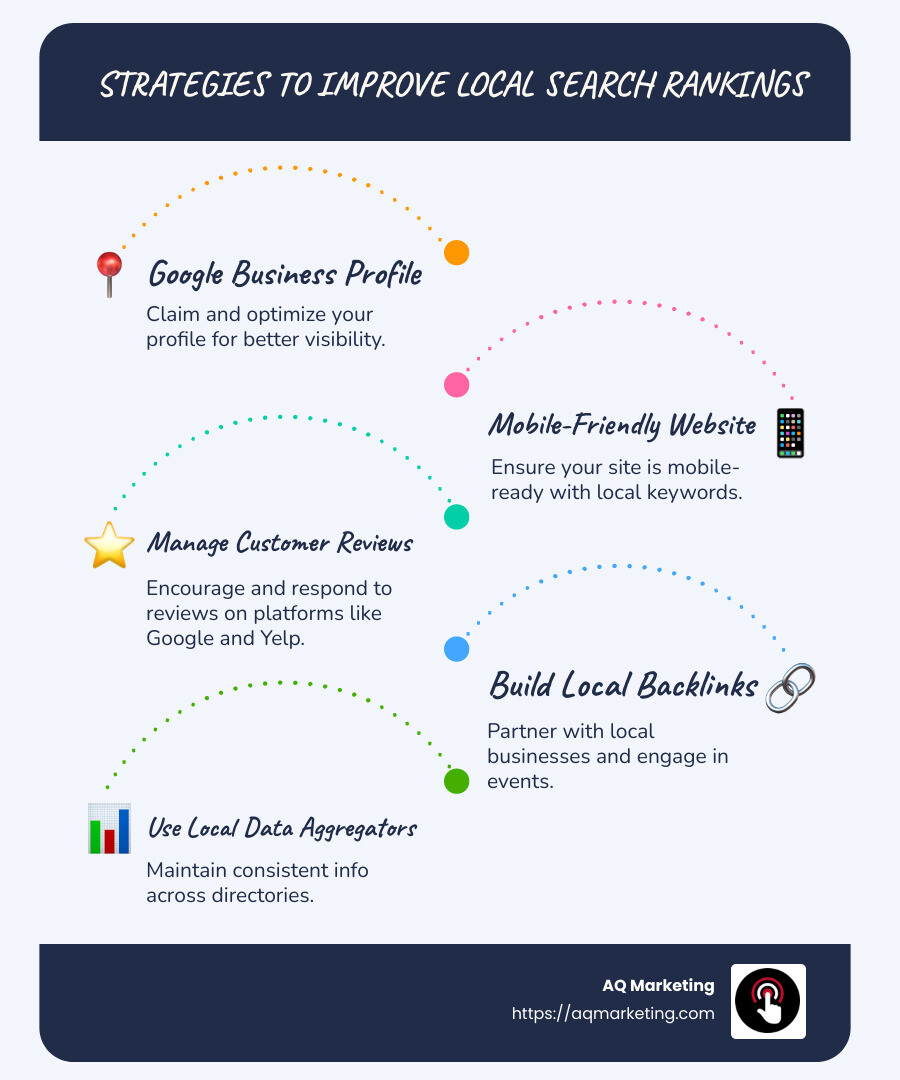
Improve local search rankings is crucial for businesses aiming to improve their online visibility in a specific location. For quick insights, here are some effective strategies:
– Claim and optimize your Google Business Profile.
– Ensure your website is mobile-friendly with targeted local keywords.
– Encourage and manage customer reviews on platforms like Google and Yelp.
– Build local backlinks by partnering with local businesses and engaging in community events.
– Use local data aggregators to maintain consistent business information across directories.
Local businesses often find themselves lost in a sea of competitors, making it essential to leverage local search tactics for better visibility. Optimization for local search requires attention to elements like business profiles, customer reviews, and local links, all of which contribute to a business’s ability to attract nearby customers effectively.
I’m Robert P. Dickey, President and CEO of AQ Marketing. With over 20 years of experience in digital marketing, I have helped small businesses improve local search rankings by focusing on strategies that drive traffic and boost visibility. Let’s dive deeper into the steps you can take.
Improve local search rankings definitions:
– Google My Business SEO
– Google My Business marketing
– Digital marketing for home services
Optimize Your Google Business Profile
Your Google Business Profile (GBP) is like your digital storefront on Google. It’s one of the first things potential customers see when they search for local businesses. Optimizing it can significantly improve local search rankings.
Complete Your Profile with Accurate Information
First things first: fill out your profile completely. This means adding your full business name, address, phone number, website URL, and hours of operation. Make sure all this information is accurate and matches what’s on your website and other online platforms. Inconsistencies can confuse customers and search engines alike.
Pro Tip: Regularly update your GBP with any changes to your business information. This keeps your profile relevant and helps maintain customer trust.
Choose the Right Business Category
Selecting the correct business category is crucial. It tells Google what your business is about, which helps in matching your profile with relevant searches. Be specific. For example, if you run a bakery, choose “Bakery” instead of a more general category like “Food.”
Add High-Quality Photos

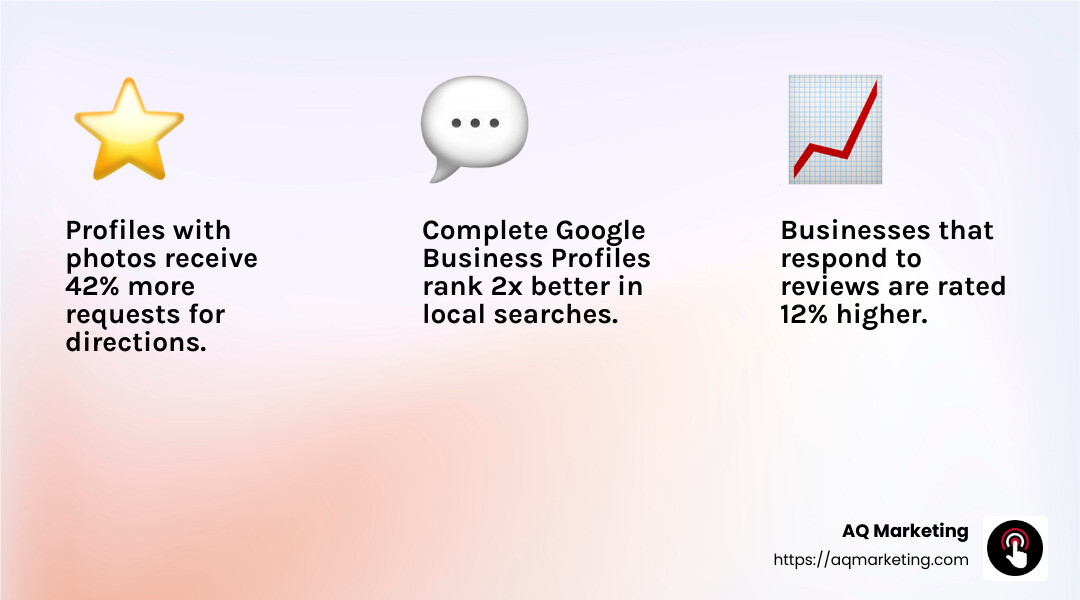
Did you know profiles with photos get 35% more clicks? Add eye-catching images of your products, interior, and exterior of your business. This visual content can make your business more appealing and trustworthy to potential customers.
Use Posts to Engage with Customers
Google Business Profile allows you to create posts similar to social media updates. Use this feature to share news, promotions, or events. It keeps your profile active and engaging, which can attract more visitors and potential customers.
Monitor and Respond to Reviews
Reviews are a key part of your GBP. Encourage satisfied customers to leave positive reviews. Respond to all reviews, whether they’re good or bad. This interaction shows that you value customer feedback and are committed to improving their experience.
By optimizing your Google Business Profile with complete data, accurate information, and engaging content, you’re setting your business up for success in local search results. Next, we’ll explore how to improve your website with SEO strategies to further boost your online presence.
Edit Your Website With SEO In Mind
Your website is the digital heart of your business. Optimizing it for search engines can help improve local search rankings and attract more visitors. Let’s explore the key elements you need to focus on.
Make Your Website Mobile-Friendly
Did you know that over half of all internet traffic comes from mobile devices? If your site doesn’t look good on a smartphone or tablet, users might leave quickly. This can hurt your rankings. Google also uses mobile-first indexing, meaning it primarily evaluates the mobile version of your site. So, ensure your website is responsive and easy to steer on any device.
Use Valuable Keywords
Keywords are the words and phrases people type into search engines. They help Google understand what your site is about. To find the right keywords, think about what your customers might search for. Tools like Semrush’s Keyword Magic Tool can help you find keywords relevant to your business and location. Once you have your list, sprinkle these keywords naturally throughout your site, including in page titles, headers, and body content. But remember, avoid keyword stuffing. Keep it readable and engaging.
Ensure Consistency Across All Platforms
Consistency is key. Make sure your business name, address, and phone number (NAP) are the same everywhere online. This includes your website, Google Business Profile, and social media pages. Inconsistent information can confuse both users and search engines, potentially damaging your local SEO efforts.
Focus on On-Page SEO
On-page SEO involves optimizing individual pages on your site. This includes using descriptive and keyword-rich URLs, crafting compelling meta titles and descriptions, and adding alt text to images. These elements help search engines understand your content and improve your chances of ranking higher.
Improve Readability
Your website content should be easy to read. Use short sentences and paragraphs. Break up text with headers, bullet points, and images. This makes your content more digestible and keeps visitors engaged longer. A good user experience can lead to better rankings.
Optimize Meta Tags
Meta tags are snippets of text that describe a page’s content. They don’t appear on the page itself but in the page’s code. Meta titles and descriptions are important because they show up in search results. Make them clear, concise, and enticing to encourage clicks. Including your target keywords can also help with SEO.
By focusing on these SEO strategies, you can make your website a powerful tool for attracting local customers and improving your online visibility. Up next, we’ll discuss how to implement a content marketing strategy to further improve your local SEO efforts.
Implement a Content Marketing Strategy
Content marketing is like planting seeds that grow into strong customer relationships and improved local search rankings. Here’s how you can cultivate a successful strategy.
Create Keyword-Optimized Content
Start by identifying the keywords your local audience uses. These are the phrases they type into search engines when looking for services like yours. Tools like Semrush’s Keyword Magic Tool can help you find the right keywords for your business.
Once you have your keywords, incorporate them naturally into your content. This means using them in blog posts, service pages, and even in your image alt texts. But remember, keep it natural and avoid keyword stuffing. The aim is to improve readability while helping search engines understand what your content is about.
Write Engaging Blog Posts
Blog posts are a great way to share valuable information with your audience. They allow you to dive deep into topics that interest your customers and showcase your expertise. For example, if you run a plumbing business, you might write about “How to Prevent Frozen Pipes in Boston Winters.” This not only provides helpful tips but also uses local keywords that can boost your local search rankings.
Brian Cairns from ProStrategix Consulting suggests writing posts that are 800-1000 words long and include hyper-localized sections. This approach ensures your content is both informative and relevant to your specific area.
Build Strong Customer Relationships
Content marketing is not just about attracting clicks; it’s about building trust. When you consistently provide high-quality content, your audience begins to see you as a reliable source of information. They start to know, like, and trust your business. This trust can lead to more inquiries, bookings, and sales.
Consider sharing customer success stories or case studies. These can highlight real-life examples of how your services have helped others. It’s a powerful way to connect with potential customers on a personal level.
Focus on High-Quality Content
Quality should always come before quantity. High-quality content is informative, engaging, and easy to understand. It should address your audience’s pain points and offer solutions. Your goal is to provide value.
Incorporate elements like images, videos, or infographics to make your content more engaging. Educational videos, for instance, can break down complex topics and make them more accessible to your audience.
By implementing a strategic content marketing plan, you can boost your local SEO efforts, attract more visitors, and nurture lasting customer relationships. Next, let’s explore the importance of collecting and responding to customer reviews.
Collect and Respond to Customer Reviews
Customer reviews are a powerful tool for businesses looking to improve local search rankings. They not only influence potential customers but also play a crucial role in how search engines perceive your business.
The Impact of Positive and Authentic Reviews
Positive reviews can significantly boost your online reputation. They provide social proof, showing potential customers that others value your services. According to a survey by BrightLocal, 77% of consumers “always” or “regularly” read reviews when comparing local businesses. This means that having a high volume of positive reviews can set you apart from competitors.
Authenticity is key. Customers are savvy and can spot fake reviews. Genuine feedback builds trust and credibility. Encourage your customers to share their honest experiences on platforms like Google Reviews, Yelp, and Thumbtack. These platforms are widely recognized and can improve your visibility.
Effective Review Management
Managing reviews involves more than just collecting them. It requires a proactive approach to responding to feedback. Studies show that 53.3% of customers expect businesses to respond to negative reviews within a week. Responding promptly to both positive and negative reviews shows that you value customer feedback and are committed to improving your services.
Here’s how to manage your reviews effectively:
- Respond Promptly: Whether the review is positive or negative, a quick response shows that you care. Thank positive reviewers and address any concerns from negative feedback.
- Offer Solutions: For negative reviews, offer to remedy the situation. This could involve issuing a refund or providing a discount on future services.
- Encourage More Reviews: Don’t hesitate to ask satisfied customers to leave a review. According to BrightLocal, 72% of customers will leave a review if asked.
Leveraging Reviews for Better Rankings
Search engines like Google consider the number and quality of reviews when ranking local businesses. More positive reviews can lead to higher rankings, making it easier for potential customers to find you.
By actively collecting and responding to reviews, you not only improve your local search rankings but also build a strong online reputation. This can lead to increased customer trust and, ultimately, more business.
Next, we’ll dive into the importance of building local links to further improve your local SEO efforts.
Spend Time Building Local Links
Building a strong backlink profile is crucial to improve local search rankings. Backlinks are links from other websites to yours. They act like votes of confidence, telling search engines that your site is trustworthy and valuable.
The Power of Local Links
Local links are especially important for businesses targeting a specific area. These links come from websites based in your community or region. They signal to search engines that your business is relevant to local searches.
Partner with Local Businesses: Collaborate with businesses in your area that serve similar customers. For example, a local bakery could partner with a nearby coffee shop. You can link to each other’s websites, creating a network of local support.
Sponsor Local Events: Getting involved in community events is a great way to earn local links. When you sponsor an event, your business often gets mentioned on the event’s website. This can lead to valuable backlinks.
Guest Blogging: Write articles for local blogs or websites. Make sure to include a link back to your website in the content. This not only builds your backlink profile but also positions you as an expert in your field.
Aim for Authoritative Sites
Not all backlinks are created equal. Links from authoritative sites carry more weight. These are sites that search engines see as trustworthy and credible.
Seek Out Authoritative Sites: Look for opportunities to get mentioned on well-respected local websites. This could include local news outlets, community organizations, or industry-specific websites.
Avoid Spammy Links: Be cautious of low-quality or spammy sites. These can harm your local search rankings instead of helping them.
Tracking Your Backlink Success
To see the impact of your efforts, keep track of where your backlinks are coming from. Use tools like Google Search Console to monitor your backlink profile and ensure you’re getting links from reputable sources.
By focusing on building local links, you not only improve your search rankings but also strengthen your community ties. This can lead to increased visibility and more customers finding your business.
Next, we’ll explore how using local data aggregators can further boost your local SEO strategy.
Use Local Data Aggregators
To improve local search rankings, ensure your business information is consistent and visible across the internet. This is where local data aggregators come into play. They help distribute your business data to various directories, making it easier for potential customers to find you.
What Are Local Data Aggregators?
Local data aggregators are platforms that collect and distribute business information to numerous online directories. They ensure your business name, address, and phone number (NAP) are consistent everywhere. This consistency is crucial because search engines like Google use it as a trust signal.
Why Consistency Matters
Inconsistent information can confuse search engines and customers alike. Imagine if your business address is listed differently on various sites. This can lead to lower search rankings and frustrated customers. Consistency across all platforms helps build trust and authority.
How to Use Local Data Aggregators
- Choose Your Aggregator: There are several well-known aggregators, like Infogroup and Localeze. Pick one that suits your needs and budget.
- Submit Your Information: Provide accurate and up-to-date NAP details. Double-check for any errors before submission.
- Monitor and Update: Regularly check your listings to ensure they remain accurate. Update them whenever your business information changes.
Benefits of Using Aggregators
- Wider Reach: Aggregators distribute your data to a broad range of directories, increasing your business’s online presence.
- Time-Saving: Instead of manually updating each directory, aggregators do it for you, saving valuable time.
- Improved Local SEO: Consistent and authoritative citations from multiple directories boost your local search rankings.
Authoritative Citations and Business Directories
Not all directories are created equal. Focus on getting listed in authoritative directories, as they carry more weight in search engine algorithms. Examples include Yelp and TripAdvisor for restaurants, or Zillow for real estate agents.
Authoritative Citations: These are mentions of your business on high-quality websites. They improve your credibility and improve local search rankings.
Business Directories: Ensure your business is listed on relevant directories. For instance, a hotel should be on travel-related sites, while a local gym might benefit from fitness-specific directories.
By leveraging local data aggregators and maintaining consistent business information across authoritative directories, you can effectively improve your local search presence. This strategy helps potential customers find you easily, leading to increased foot traffic and sales.
Next, we’ll dive into the importance of adding local business schema to your website to further optimize your local SEO efforts.
Add Local Business Schema to Your Website
Adding local business schema to your website is a smart move to improve local search rankings. Schema markup is a type of structured data that helps search engines understand the content on your pages better. When you use local business schema, you give Google and other search engines clear information about your business, like your location, operating hours, and services.
What is Schema Markup?
Schema markup is a code you add to your website to provide additional context to search engines. Think of it as a way to talk directly to Google, telling it exactly what your business is about. This can help your site appear in relevant local search results.
Benefits of Local Business Schema
- Improved Visibility: By using local business schema, your business information can appear in rich snippets, which are more eye-catching in search results.
- Improved Click-Through Rates: Rich snippets often lead to higher click-through rates because they provide users with more information upfront.
- Better Understanding by Google: Schema helps Google understand your business better, which can lead to improved local rankings.
How to Implement Local Business Schema
- Choose the Right Tool: Use tools like Google’s Structured Data Markup Helper to generate schema markup. This tool is beginner-friendly and helps you create the necessary code without needing to know how to code.
- Define Your Business Type: Use Schema.org’s vocabulary to accurately define your business type and provide key information like address, phone number, and business hours.
- Add the Code to Your Website: Once your schema markup is ready, add it to your website’s HTML. Most often, this is done in the
<head>section of your pages. - Validate Your Schema: Use the Schema Markup Validator from Schema.org to check for errors. Ensuring your markup is error-free is crucial for it to be effective.
Types of Schema to Consider
- Local Business Schema: This is essential for any local business and includes basic information like NAP details and business category.
- Review Schema: This can improve your visibility by displaying star ratings in search results, which can attract more clicks.
By implementing local business schema, you help search engines crawl your site more effectively and understand your business context. This structured data can give you an edge in local search results, making it easier for potential customers to find you.
Next, we’ll explore how creating location-specific pages can further amplify your local SEO strategy.
Create Location Pages
Creating location pages is a vital step to improve local search rankings for businesses with multiple locations or service areas. These pages provide detailed, location-specific content that helps search engines and users understand where you operate and what you offer.
Why Location Pages Matter
Location pages are like digital storefronts for each of your business locations. They give potential customers all the information they need to find and visit you. Here’s what to include:
- Address and Contact Information: Make sure each page has the correct name, address, and phone number (NAP). Consistency is key across all online platforms.
- Operating Hours: Clearly state when each location is open to avoid confusion.
- Unique Descriptions: Write unique content for each location. Highlight what makes each store or service area special. Avoid duplicating content across pages.
- Customer Testimonials: Include quotes from satisfied customers specific to each location. This builds trust and encourages new customers to visit.
Improve with Visuals
Adding visuals can make your location pages more engaging and informative:
- Maps: Embed a Google Map to show exactly where your business is located. This helps with “near me” searches and improves user experience.
- Photos: Include photos of the location, both inside and outside. This can help customers recognize your business when they visit.
Local Landing Pages for Service Areas
If you operate a service area business, create local landing pages for each area you serve. These pages should:
- Detail Your Services: Clearly outline the services you offer in each area.
- Highlight Area-Specific Information: Mention any local events, partnerships, or community involvement.
- Use Local Keywords: Incorporate keywords relevant to each area to boost local search rankings.
Real-World Example
A local pizza chain in Boston, MA, uses location pages to great effect. Each page includes a map, unique photos of the restaurant, and a list of local favorites. They even feature quotes from regular customers, making each page feel personal and inviting.
By creating detailed and engaging location pages, you provide both search engines and users with valuable information that can drive more foot traffic to your business. Next, let’s look at how improving your website’s speed and Core Web Vitals can further improve your local SEO strategy.
Improve Your Website’s Speed and Core Web Vitals
Improving your website’s speed and Core Web Vitals is crucial for enhancing user experience and boosting your local search rankings. Google considers site speed a significant ranking factor, and a slow-loading site can deter potential customers.
Why Site Speed Matters
Imagine visiting a website that takes ages to load. Frustrating, right? Slow page load times can lead to high bounce rates, meaning users leave your site before it even fully loads. This negatively impacts your search rankings and can hurt your business’s reputation.
Core Web Vitals are a set of metrics Google uses to evaluate the quality of user experience on your website. These include:
- Largest Contentful Paint (LCP): Measures loading performance. Aim for LCP to occur within 2.5 seconds of when the page first starts loading.
- First Input Delay (FID): Measures interactivity. Aim for an FID of less than 100 milliseconds.
- Cumulative Layout Shift (CLS): Measures visual stability. Aim for a CLS score of less than 0.1.
How to Improve Site Speed
To improve local search rankings, focus on optimizing your site’s speed and Core Web Vitals. Here are some tips:
- Optimize Images: Large images can slow down your site. Use compressed images without losing quality.
- Enable Browser Caching: Allow browsers to store some of your site’s files for quicker loading on return visits.
- Minimize JavaScript and CSS: Reduce the size of your JavaScript and CSS files to speed up page loading.
- Use a Content Delivery Network (CDN): CDNs distribute your site’s files across multiple servers worldwide, reducing the distance data needs to travel.
Real-World Success
A local bakery in Woburn, MA, improved its website’s speed by optimizing images and using a CDN. As a result, their page load times decreased significantly, leading to a 25% increase in online orders and improved search rankings.
By focusing on your website’s speed and Core Web Vitals, you not only improve user experience but also position your business better in local search results. This can lead to more traffic and, ultimately, more customers.
Next, we’ll explore how tracking and managing your online reviews can further support your local SEO efforts.
Track and Manage Your Online Reviews
Managing online reviews is a key part of improving local search rankings. Reviews not only influence potential customers but also impact how search engines perceive your business. Let’s explore the essentials of tracking and managing these reviews.
Why Reviews Matter
Reviews build trust. A BrightLocal survey found that 77% of consumers regularly read reviews when comparing local businesses. A high review score can make your business stand out, while a low score can deter potential customers.
Review count and score are crucial. Having a substantial number of positive reviews boosts your credibility. Google also considers these factors in its ranking algorithm, making them vital for local SEO.
Responding to Feedback
Engage with your customers by responding to reviews. This shows that you value their feedback and are committed to improving your services. A prompt response to both positive and negative reviews can significantly improve your business image.
53.3% of customers expect businesses to respond to negative reviews within a week. Addressing concerns quickly and offering solutions, like a refund or a discount, can turn a dissatisfied customer into a loyal one.
Incentivizing Reviews
Encourage customers to leave reviews by offering incentives. This could be a discount on their next purchase or a small gift card. According to BrightLocal, 72% of customers will write a review if asked, especially when there’s something in it for them.
Tools for Review Management
Use tools like Semrush Local to track and manage your reviews across multiple platforms. This tool allows you to see all your reviews in one place, respond to them directly, and ensure your online reputation remains positive.
By actively managing your online reviews, you can build customer trust, improve your review score, and ultimately, improve local search rankings. Next, we’ll discuss how using local data aggregators can streamline your business data distribution.
Frequently Asked Questions about Improving Local Search Rankings
How to Improve Local Ranking in 5 Steps
- Optimize Your Google Business Profile: Ensure your profile is complete with accurate business information, high-quality photos, and your business category. This helps you appear in local searches and is crucial for local SEO.
- Improve Website SEO: Make sure your website is mobile-friendly and optimized with valuable keywords. Consistency in information across platforms and proper use of meta tags will boost your visibility.
- Implement a Content Marketing Strategy: Create keyword-optimized content that appeals to your local audience. Blog posts, customer stories, and local events can help build relationships and trust.
- Manage Customer Reviews: Regularly collect and respond to customer feedback on platforms like Google and Yelp. Positive reviews increase trust and can improve your search rankings.
- Build Local Links: Partner with local businesses and engage in guest blogging to create a strong backlink profile. Local links from reputable sites can improve your authority and rankings.
How to Optimize for Local Search
- Use Title and Description Tags: Optimize your title and description tags with local keywords. This helps search engines understand your content’s relevance to local queries.
- Leverage Online Directories: Ensure your business is listed in relevant online directories. Consistent information across these platforms can improve your local search presence.
- Engage on Social Media: Use social media to connect with your audience and promote your content. Social signals can indirectly influence local SEO.
- Update Your Google Business Profile: Keep your profile updated with current information and engaging posts. This maintains your relevance in local searches.
How to Rank Higher in Local SEO
- Focus on Online Customers: Understand local customer intentions and tailor your content to meet their needs. This can increase engagement and boost rankings.
- Regular Content Updates: Keep your website fresh with updated content. Regular updates signal to search engines that your site is active and relevant.
- Optimize for Keywords: Use local keywords throughout your content, including in headings and meta tags, to improve visibility in local searches.
- Strengthen Backlinks: Acquire backlinks from authoritative local sources. High-quality backlinks are a significant factor in Google’s ranking algorithm.
By following these strategies, you can effectively improve local search rankings and attract more online customers. Next, we’ll explore how to use local data aggregators to improve your business’s online presence.
Conclusion
At AQ Marketing, we specialize in helping small to medium-sized businesses improve their online presence and achieve long-term results. Our expertise in SEO, website design, and social media management is custom to meet the unique needs of industries like home services and insurance.
Our team understands the importance of a strong online presence in today’s digital landscape. We work diligently to ensure your business stands out in local search results. By optimizing your Google Business Profile, improving your website’s SEO, and implementing effective content marketing strategies, we help you connect with more potential customers.
We also know that managing customer reviews and building local links are crucial for maintaining a positive online reputation and improving search rankings. Our comprehensive approach ensures that every aspect of your digital marketing strategy is covered, from website design to social media engagement.
Partnering with AQ Marketing means you’re investing in a team committed to delivering impactful, long-lasting results. Let us help you steer the complexities of local SEO and lift your business’s online visibility.
Ready to take your digital marketing to the next level? Learn more about our Business Profile Management services and see how we can transform your online presence.
